The second method is to use notepad & type out all the information, some which may not be included in the first method such as your case, keyboard, mouse & monitor or [Build Log]. There is no specific order however the following is a good example.
or you can simply copy & paste it into the thread, example:
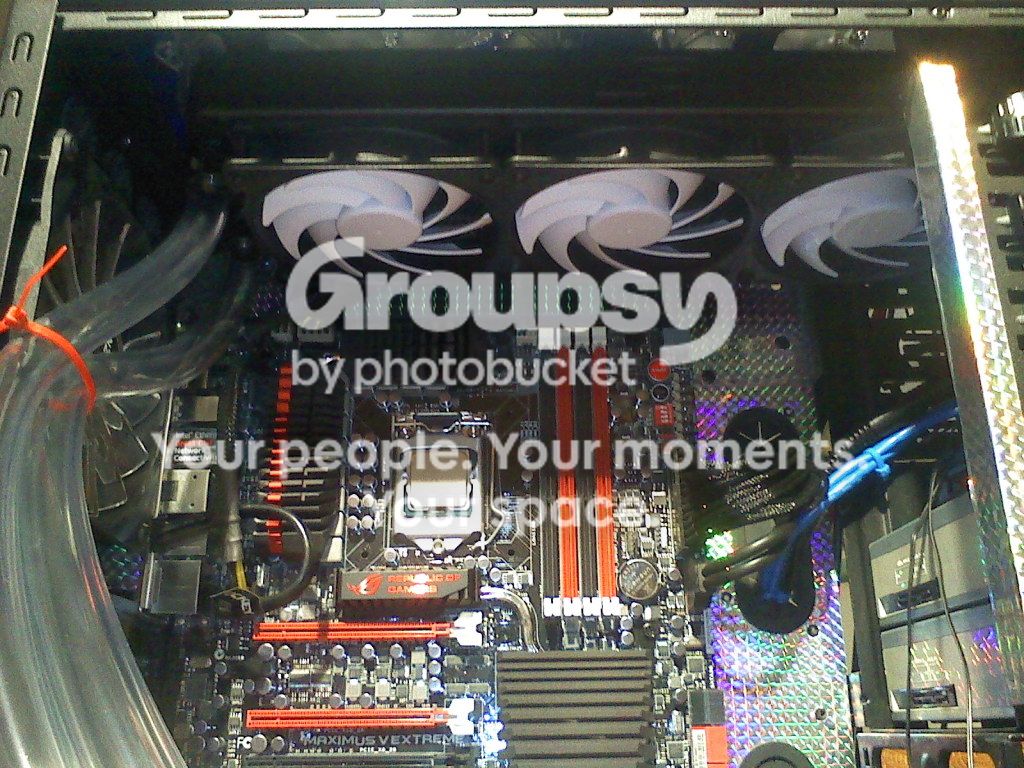
CoolerMaster HAF-X 942 Advanced (Customized)
Windows 10 Pro 64 bit
ASUS MAXIMUS V-EXTREME, 1155 Z77
i7-3770k @ 3.50GHZ
GSkill (8X4) 32GB DDR3-2133
HT Omega FENIX 7.1 Sound Card
Swiftek H20-320 Liquid Cooling
EVGA GeForce GTX670 4GB (X 3-SLI)
EVGA 1300 watt SuperNova
(X2) OCZ Vertex 4-256GB SSD (RAID0)
Wester Digital Velociraptor 500GB
Western Digital 1TB 7200 RPM
[Build Log/Guide]-
This method is lengthy but it allows others to view it easily & post replies without opening links. It’s very simple, if you want correct answers to questions the more specific you are will result in a more specific answer. Use photobucket to even enhance what it is your trying to describe. With all the technology available today you can share almost everything but be cautious in what you share. One thing to remember is to read thru the post as not all answer will be correct simply because we are all human ( including me ), it’s best to get the answer verified with the opinion of others!
Go to the following Link to obtain the Anniversary Upgrade, before you install the upgrade ALWAYS create a Restore Point!
LINK: https://support.microsoft.com/en-us/help/12387/windows-10-update-history?ocid=update_setting_client
Select - GET THE ANNIVERSARY UPDATE NOW to begin the upgrade.
It’s that simple! I will test it for further issues & reply to this thread later with any items I may find.
It’s been a couple of months since I’ve added to this post as I’ve been busy with other issues. I’ve noticed there are numerous post of individuals having issues so I decided to add some more insight to the thread. The majority of the issues are related to system performance overall with a few exceptions. Instead of countless post of information general users don’t read I have come to the conclusion it’s simpler to help those whom need assistance using TeamSpeak3 so as to communicate with ease & resolve issues however it also has some limitations. If your needing help resolving a issue I will assist U.S. & Canadian players via TeamSpeak3 at the following address: https://gyazo.com/fc310dbc0d42c242d2f2cf45f48edc42
I’m usually helping others on a regular basis & if your in need of assistance, send me a message via Origin or simply join my TeamSpeak3. If you don’t have TeamSpeak3, it’s easy to install & I will assist you in getting connected if you need help. Remember I ONLY offer this to U.S. & Canadian players!
I can be found in one of the following servers providing I’m playing a game:
1st off delete all the files located in the pb folder for bf4. download this → http://evenbalance.com/pbsetup.php extract the setup file to the same folder and run it as admin. It will download all the latest pb files. Then download this → http://evenbalance.com/downloads/pbsvc/pbsvc.exe it will test your punkbuster services are installed and running properly. [color]
# 49 - How to get around the NEW USER INTERFACEThe reason for even mentioning this is because some have had nothing but trouble using it & I’m not 100% positive but the game seems to function better without it. I use Google Chrome to do this & I’m sure you can do it with other browsers. Below are the steps to follow to complete the task: ( 1 ) Open Chrome & look in the TOP RIGHT corner of the browser as shown in the following link. https://gyazo.com/4df060194961a673db0c34e0f33ebce9 ( 2 ) Click on the dots the red arrow is pointing at. A drop box appears as in the following pic, click on settings https://gyazo.com/ea3fff8702f7f4cd62932a760807a8d1 ( 3 ) Scroll down & find On Startup as shown in the following pic https://gyazo.com/fd473f153905858ac8f4e7f31a879050 ( 4 ) Select Open a specific page or set of pages or add a new page as shown.( 5 ) Copy & paste in this URLhttp://battlelog.battlefield.com/bf4/ ( 6 ) Paste it in the Site URL as shown in the following pic. https://gyazo.com/6c79209bc94a20355bae667504519a35 Select SAVE Close your browser to your desktop. Restart Google Chrome & when the page opens it should go to or have a tab at the top of the browser to open BATTLELOG as shown in the following pic. https://gyazo.com/81b02e07d7b96467020968401f984fbf
*NOTE: You do NOT have to have Google Chrome as your default browser to do this!Each time you go to play the game log into Origin then go to Google chrome & open it then you will be able to access BATTLLOG & not be required to play the game thru the New User InterphaseYes, it’s that simple!!!
# 50 Improvements playing in 60Hz servers vs 30 HzThe reason for posting this is simply to inform the community that I myself have upgraded both of my servers to 60 Hz & there is somewhat a more responsive gameplay! The overall graphical features seem to be a slight bit different as well. I have noticed the ping values are still the same however the in-game FPS is a touch higher. As of now I haven’t seen or completed any changes in my settings other than I did move my resolution scaling up from 125% to 150% after testing the servers for roughly 2 hours each. If you have a good video card I would suggest turning up your resolution scaling in increments of 5. If your player seems to shutter then revert in 5% intervals until the gameplay is decent or improved.
# 51 - RESOLVE MISSING PING * * * H O T ~ ~ TOPIC * * * *
Open Administrative Tools / Windows Firewall with Advanced Security, and create a new custom rule for BOTH ICMPv4 and v6 to allow access to BF4 exe, you have to create a rule for each one! Restart your browser! Google search allow ICMP access and Microsoft walks you through the steps. It’s easy!
The latest Battlefield 4 update has broken the user interface. This patch was either released 12/9/2017 or 13/9/2017. It was released without any notice or any patch notes.
If you start up the game with the UI mode, you will get a black screen with some text appearing. I think EA/DICE has accidentally released a patch. - I am using Origin Beta.
I’ve tried it both ways & receive no errors, I even had others try it to see if it is possibly a hardware arrangement issue but others say it has no errors same as mine!
Deleting that Origin Cache made such a difference in BOTH BF3 AND BF4!! awesome!!
Thanks EA for a well written post , easy for all to follow. Glad it’s here!
I’m probly not the only person who gets the infinite loading issues in BF5. But if you have a problem loading into the next map, and having to CTRL+Alt+Delete out and restart bf5.
I have found a resolution to this issue that worked for me. I do not guarantee this will work for others though. So proceed with caution.
Make sure all you video card drivers are up to date.
make sure windows is updated.
In origin, click on BF5 to bring up the menu.
Click on the cog next to the play button, and select repair.
When the game is fully repaired, hit the windows key + “x”.
Select the “Command Prompt (admin)” button.
*all steps below, the commands that need to be typed in are between the "Command to type is here ". leave the quotation marks out.
In the command prompt type, “DISM.exe /Online /Clenup-image /Restorehealth”. Then press enter.
At 20% it will seem like it gets stuck, but after a few minutes it will continue. Do not exit out at any cost!!!
When complete, stay in the cmd prompt and type, “SFC /SCANNOW”, and press enter.
When complete, restart the computer, run origin as admin.
I hope this helps other people out, but it has been working for me thus far. Good luck!


 Good Luck & Best Wishes


