[Megathread] Performance issues/Stutter BF5 - PC

Is this possible that Origin Servers was caused issue? Game was exit to desktop near 3.a.m 2 June without error message in event log,just exit. But i saw Origin for a moment white/grey screen and loading circle and again fine. Just asking :slight_smile:

I was in Campaign Singleplayer MOde,ONLINE mode ORigin. But in offline mode its possible to play.

Think I’ve finished maybew 2 full rounds since the patch borked stability. Dozens of CTD’s. Too frustrating to try to play this game.. I’m looking for another and will jump the BF ship as soon as I locate one if they do not fix this crashing and stop blaming it on the end users.

An 8700 is more than enough to play this game. Its not the problem. Start by making sure nothing is throttling and your hardware is operating as it should be.

Spikes in CPU on the graph indicate TIME not USAGE. So the next step is to check why those spikes in TIME are occuring. That would happen because either you have some other process running that’s using the CPU, your windows machine is overbloated and you should run a maintenance on it, or you have disk access or some other expensive access happening. Paging is a common issue here.

Try a clean boot. Trying increasing BF V priority in task manager. Run stress tests on your system. Run userbenchmark.exe on your system to see if anything is underpeforming.

If you’re feeling more bold, run process explorer and put the game into windowed mode and analyze it from in game to see what’s happening.

Run latencymon while the game is running to check for latency issues.

Beyond that no one can really tell you what the problem is. ONly suggest what’s been tried.

That’s interesting. I wonder if origin goes offline, the game closes. Ill have to check.

There is a set of log files:

C:\ProgramData\Origin\Logs\Client_log
Check to see if origin logged an event.

0:016> !analyze -v


*** Exception Analysis ***


WARNING: Unable to verify timestamp for dbdata.dll

KEY_VALUES_STRING: 1

Key : AV.Dereference
Value: NullClassPtr

Key : AV.Fault
Value: Read

Key : Analysis.CPU.Sec
Value: 5

Key : Analysis.Elapsed.Sec
Value: 131

Key : Analysis.Memory.CommitPeak.Mb
Value: 204

Key : Timeline.Process.Start.DeltaSec
Value: 49516

PROCESSES_ANALYSIS: 1

SERVICE_ANALYSIS: 1

STACKHASH_ANALYSIS: 1

TIMELINE_ANALYSIS: 1

Timeline: !analyze.Start
Name:
Time: 2019-06-09T17:06:57.933Z
Diff: 663944933 mSec

Timeline: Dump.Current
Name:
Time: 2019-06-02T00:41:13.0Z
Diff: 0 mSec

Timeline: Process.Start
Name:
Time: 2019-06-01T10:55:57.0Z
Diff: 49516000 mSec

DUMP_CLASS: 2

DUMP_QUALIFIER: 400

MODLIST_WITH_TSCHKSUM_HASH: ecae460c3b09697da4b7d808edddb7af9cabb419

MODLIST_SHA1_HASH: b436539aa6f3750791d04ac1da7f12b3daf8b6e7

COMMENT: Frostbite MiniDump. Address: 0000000145DE184D (In Windbg type: .ecxr)
[EOF]

NTGLOBALFLAG: 0

PROCESS_BAM_CURRENT_THROTTLED: 0

PROCESS_BAM_PREVIOUS_THROTTLED: 0

DUMP_FLAGS: a2

DUMP_TYPE: 11

CONTEXT: (.ecxr)
rax=00000000abd23ce0 rbx=00000000accc5820 rcx=0000000000000000
rdx=0000000000000000 rsi=000000000055fd80 rdi=0000000033fe2710
rip=0000000145de184d rsp=0000000033fe1a00 rbp=0000000033fe1be0
r8=0000000000000006 r9=0000000000000001 r10=0000000000000006
r11=0000000033fe1a68 r12=0000000000000000 r13=0000000000000000
r14=ffffffffffffffff r15=0000000000000000
iopl=0 nv up ei pl zr na po nc
cs=0033 ¯_(ツ)_/¯=002b ds=002b es=002b fs=0053 gs=002b efl=00010246
bfv+0x5de184d:
0000000145de184d 488b5238 mov rdx,qword ptr [rdx+38h] ds:0000000000000038=???
Resetting default scope

FAULTING_IP:
bfv+5de184d
00000001`45de184d 488b5238 mov rdx,qword ptr [rdx+38h]

EXCEPTION_RECORD: (.exr -1)
ExceptionAddress: 0000000145de184d (bfv+0x0000000005de184d)
ExceptionCode: c0000005 (Access violation)
ExceptionFlags: 00000000
NumberParameters: 2
Parameter[0]: 0000000000000000
Parameter[1]: 0000000000000038
Attempt to read from address 0000000000000038

DEFAULT_BUCKET_ID: NULL_CLASS_PTR_READ

PROCESS_NAME: bfv.exe

FOLLOWUP_IP:
bfv+5de184d
00000001`45de184d 488b5238 mov rdx,qword ptr [rdx+38h]

READ_ADDRESS: 0000000000000038

ERROR_CODE: (NTSTATUS) 0xc0000005 -

EXCEPTION_CODE: (NTSTATUS) 0xc0000005 -

EXCEPTION_CODE_STR: c0000005

EXCEPTION_PARAMETER1: 0000000000000000

EXCEPTION_PARAMETER2: 0000000000000038

WATSON_BKT_PROCSTAMP: 5047ff9c

WATSON_BKT_MODULE: bfv.exe

WATSON_BKT_MODSTAMP: 5cdbc3d7

WATSON_BKT_MODOFFSET: 5de184d

WATSON_BKT_MODVER: 1.0.72.44435

BUILD_VERSION_STRING: 17763.1.amd64fre.rs5_release.180914-1434

ANALYSIS_SESSION_HOST: DESKTOP-RVP2EUM

ANALYSIS_SESSION_TIME: 06-09-2019 19:06:57.0933

ANALYSIS_VERSION: 10.0.18869.1002 amd64fre

THREAD_ATTRIBUTES:
OS_LOCALE: PLK

BUGCHECK_STR: APPLICATION_FAULT_NULL_CLASS_PTR_READ_NULL_CLASS_PTR_DEREFERENCE_INVALID_POINTER_READ

PRIMARY_PROBLEM_CLASS: APPLICATION_FAULT

PROBLEM_CLASSES:

ID: [0n313]
Type: [@ACCESS_VIOLATION]
Class: Addendum
Scope: BUCKET_ID
Name: Omit
Data: Omit
PID: [Unspecified]
TID: [0xb30]
Frame: [0] : bfv

ID: [0n285]
Type: [INVALID_POINTER_READ]
Class: Primary
Scope: BUCKET_ID
Name: Add
Data: Omit
PID: [Unspecified]
TID: [0xb30]
Frame: [0] : bfv

ID: [0n309]
Type: [NULL_CLASS_PTR_DEREFERENCE]
Class: Primary
Scope: BUCKET_ID
Name: Add
Data: Omit
PID: [Unspecified]
TID: [0xb30]
Frame: [0] : bfv

ID: [0n310]
Type: [NULL_CLASS_PTR_READ]
Class: Primary
Scope: DEFAULT_BUCKET_ID (Failure Bucket ID prefix)
BUCKET_ID
Name: Add
Data: Omit
PID: [0x28cc]
TID: [0xb30]
Frame: [0] : bfv

IP_ON_HEAP: 0000000000400000
The fault address in not in any loaded module, please check your build’s rebase
log at \bin\build_logs\timebuild\ntrebase.log for module which may
contain the address if it were loaded.

FRAME_ONE_INVALID: 1

LAST_CONTROL_TRANSFER: from 0000000000400000 to 0000000145de184d

STACK_TEXT:
0000000033fe1a00 0000000000400000 : 00000002145b8ca0 000000000055fd80 00000002188990d0 0000000000000000 : bfv+0x5de184d
0000000033fe1a08 00000002145b8ca0 : 000000000055fd80 00000002188990d0 0000000000000000 0000000000000000 : 0x400000
0000000033fe1a10 000000000055fd80 : 00000002188990d0 0000000000000000 0000000000000000 0000000033fe2710 : 0x00000002145b8ca0 0000000033fe1a18 00000002188990d0 : 0000000000000000 0000000000000000 0000000033fe2710 0000000145e11736 : 0x55fd80 0000000033fe1a20 0000000000000000 : 0000000000000000 0000000033fe2710 0000000145e11736 0000000000000006 : 0x00000002188990d0

THREAD_SHA1_HASH_MOD_FUNC: f86e706f3881ff99410f64522468510881cb97a0

THREAD_SHA1_HASH_MOD_FUNC_OFFSET: fc53bee7bd5eee7c273e1f674a644f5504b35eba

THREAD_SHA1_HASH_MOD: f86e706f3881ff99410f64522468510881cb97a0

FAULT_INSTR_CODE: 38528b48

SYMBOL_STACK_INDEX: 0

SYMBOL_NAME: bfv+5de184d

FOLLOWUP_NAME: MachineOwner

MODULE_NAME: bfv

IMAGE_NAME: bfv.exe

DEBUG_FLR_IMAGE_TIMESTAMP: 5cdbc3d7

STACK_COMMAND: ~16s ; .ecxr ; kb

FAILURE_BUCKET_ID: NULL_CLASS_PTR_READ_c0000005_bfv.exe!Unknown

BUCKET_ID: APPLICATION_FAULT_NULL_CLASS_PTR_READ_NULL_CLASS_PTR_DEREFERENCE_INVALID_POINTER_READ_bfv+5de184d

FAILURE_EXCEPTION_CODE: c0000005

FAILURE_IMAGE_NAME: bfv.exe

BUCKET_ID_IMAGE_STR: bfv.exe

FAILURE_MODULE_NAME: bfv

BUCKET_ID_MODULE_STR: bfv

FAILURE_FUNCTION_NAME: Unknown

BUCKET_ID_FUNCTION_STR: Unknown

BUCKET_ID_OFFSET: 5de184d

BUCKET_ID_MODTIMEDATESTAMP: 5cdbc3d7

BUCKET_ID_MODCHECKSUM: ef4e508

BUCKET_ID_MODVER_STR: 1.0.72.44435

BUCKET_ID_PREFIX_STR: APPLICATION_FAULT_NULL_CLASS_PTR_READ_NULL_CLASS_PTR_DEREFERENCE_INVALID_POINTER_READ_

FAILURE_PROBLEM_CLASS: APPLICATION_FAULT

FAILURE_SYMBOL_NAME: bfv.exe!Unknown

TARGET_TIME: 2019-06-02T00:41:13.000Z

OSBUILD: 17763

OSSERVICEPACK: 475

SERVICEPACK_NUMBER: 0

OS_REVISION: 0

SUITE_MASK: 256

PRODUCT_TYPE: 1

OSPLATFORM_TYPE: x64

OSNAME: Windows 10

OSEDITION: Windows 10 WinNt SingleUserTS

USER_LCID: 0

OSBUILD_TIMESTAMP: 1989-09-10 08:58:46

BUILDDATESTAMP_STR: 180914-1434

BUILDLAB_STR: rs5_release

BUILDOSVER_STR: 10.0.17763.1.amd64fre.rs5_release.180914-1434

ANALYSIS_SESSION_ELAPSED_TIME: 2033c

ANALYSIS_SOURCE: UM

FAILURE_ID_HASH_STRING: um:null_class_ptr_read_c0000005_bfv.exe!unknown

FAILURE_ID_HASH: {f476daa4-68b6-2895-45dc-838c7fe6b3de}

Link to section: Followup: MachineOwnerFollowup: MachineOwner

0:016> !analyze -v


*** Exception Analysis ***


KEY_VALUES_STRING: 1

Key : AV.Dereference
Value: NullClassPtr

Key : AV.Fault
Value: Read

Key : Analysis.CPU.Sec
Value: 1

Key : Analysis.Elapsed.Sec
Value: 1

Key : Analysis.Memory.CommitPeak.Mb
Value: 211

Key : Timeline.Process.Start.DeltaSec
Value: 49516

PROCESSES_ANALYSIS: 1

SERVICE_ANALYSIS: 1

STACKHASH_ANALYSIS: 1

TIMELINE_ANALYSIS: 1

Timeline: !analyze.Start
Name:
Time: 2019-06-09T17:09:09.843Z
Diff: 664076843 mSec

Timeline: Dump.Current
Name:
Time: 2019-06-02T00:41:13.0Z
Diff: 0 mSec

Timeline: Process.Start
Name:
Time: 2019-06-01T10:55:57.0Z
Diff: 49516000 mSec

DUMP_CLASS: 2

DUMP_QUALIFIER: 400

MODLIST_WITH_TSCHKSUM_HASH: ecae460c3b09697da4b7d808edddb7af9cabb419

MODLIST_SHA1_HASH: b436539aa6f3750791d04ac1da7f12b3daf8b6e7

COMMENT: Frostbite MiniDump. Address: 0000000145DE184D (In Windbg type: .ecxr)
[EOF]

NTGLOBALFLAG: 0

PROCESS_BAM_CURRENT_THROTTLED: 0

PROCESS_BAM_PREVIOUS_THROTTLED: 0

DUMP_FLAGS: a2

DUMP_TYPE: 11

CONTEXT: (.ecxr)
rax=00000000abd23ce0 rbx=00000000accc5820 rcx=0000000000000000
rdx=0000000000000000 rsi=000000000055fd80 rdi=0000000033fe2710
rip=0000000145de184d rsp=0000000033fe1a00 rbp=0000000033fe1be0
r8=0000000000000006 r9=0000000000000001 r10=0000000000000006
r11=0000000033fe1a68 r12=0000000000000000 r13=0000000000000000
r14=ffffffffffffffff r15=0000000000000000
iopl=0 nv up ei pl zr na po nc
cs=0033 ¯_(ツ)_/¯=002b ds=002b es=002b fs=0053 gs=002b efl=00010246
bfv+0x5de184d:
0000000145de184d 488b5238 mov rdx,qword ptr [rdx+38h] ds:0000000000000038=???
Resetting default scope

FAULTING_IP:
bfv+5de184d
00000001`45de184d 488b5238 mov rdx,qword ptr [rdx+38h]

EXCEPTION_RECORD: (.exr -1)
ExceptionAddress: 0000000145de184d (bfv+0x0000000005de184d)
ExceptionCode: c0000005 (Access violation)
ExceptionFlags: 00000000
NumberParameters: 2
Parameter[0]: 0000000000000000
Parameter[1]: 0000000000000038
Attempt to read from address 0000000000000038

DEFAULT_BUCKET_ID: NULL_CLASS_PTR_READ

PROCESS_NAME: bfv.exe

FOLLOWUP_IP:
bfv+5de184d
00000001`45de184d 488b5238 mov rdx,qword ptr [rdx+38h]

READ_ADDRESS: 0000000000000038

ERROR_CODE: (NTSTATUS) 0xc0000005 -

EXCEPTION_CODE: (NTSTATUS) 0xc0000005 -

EXCEPTION_CODE_STR: c0000005

EXCEPTION_PARAMETER1: 0000000000000000

EXCEPTION_PARAMETER2: 0000000000000038

WATSON_BKT_PROCSTAMP: 5047ff9c

WATSON_BKT_MODULE: bfv.exe

WATSON_BKT_MODSTAMP: 5cdbc3d7

WATSON_BKT_MODOFFSET: 5de184d

WATSON_BKT_MODVER: 1.0.72.44435

BUILD_VERSION_STRING: 17763.1.amd64fre.rs5_release.180914-1434

ANALYSIS_SESSION_HOST: DESKTOP-RVP2EUM

ANALYSIS_SESSION_TIME: 06-09-2019 19:09:09.0843

ANALYSIS_VERSION: 10.0.18869.1002 amd64fre

THREAD_ATTRIBUTES:
OS_LOCALE: PLK

BUGCHECK_STR: APPLICATION_FAULT_NULL_CLASS_PTR_READ_NULL_CLASS_PTR_DEREFERENCE_INVALID_POINTER_READ

PRIMARY_PROBLEM_CLASS: APPLICATION_FAULT

PROBLEM_CLASSES:

ID: [0n313]
Type: [@ACCESS_VIOLATION]
Class: Addendum
Scope: BUCKET_ID
Name: Omit
Data: Omit
PID: [Unspecified]
TID: [0xb30]
Frame: [0] : bfv

ID: [0n285]
Type: [INVALID_POINTER_READ]
Class: Primary
Scope: BUCKET_ID
Name: Add
Data: Omit
PID: [Unspecified]
TID: [0xb30]
Frame: [0] : bfv

ID: [0n309]
Type: [NULL_CLASS_PTR_DEREFERENCE]
Class: Primary
Scope: BUCKET_ID
Name: Add
Data: Omit
PID: [Unspecified]
TID: [0xb30]
Frame: [0] : bfv

ID: [0n310]
Type: [NULL_CLASS_PTR_READ]
Class: Primary
Scope: DEFAULT_BUCKET_ID (Failure Bucket ID prefix)
BUCKET_ID
Name: Add
Data: Omit
PID: [0x28cc]
TID: [0xb30]
Frame: [0] : bfv

IP_ON_HEAP: 0000000000400000
The fault address in not in any loaded module, please check your build’s rebase
log at \bin\build_logs\timebuild\ntrebase.log for module which may
contain the address if it were loaded.

FRAME_ONE_INVALID: 1

LAST_CONTROL_TRANSFER: from 0000000000400000 to 0000000145de184d

STACK_TEXT:
0000000033fe1a00 0000000000400000 : 00000002145b8ca0 000000000055fd80 00000002188990d0 0000000000000000 : bfv+0x5de184d
0000000033fe1a08 00000002145b8ca0 : 000000000055fd80 00000002188990d0 0000000000000000 0000000000000000 : 0x400000
0000000033fe1a10 000000000055fd80 : 00000002188990d0 0000000000000000 0000000000000000 0000000033fe2710 : 0x00000002145b8ca0 0000000033fe1a18 00000002188990d0 : 0000000000000000 0000000000000000 0000000033fe2710 0000000145e11736 : 0x55fd80 0000000033fe1a20 0000000000000000 : 0000000000000000 0000000033fe2710 0000000145e11736 0000000000000006 : 0x00000002188990d0

THREAD_SHA1_HASH_MOD_FUNC: f86e706f3881ff99410f64522468510881cb97a0

THREAD_SHA1_HASH_MOD_FUNC_OFFSET: fc53bee7bd5eee7c273e1f674a644f5504b35eba

THREAD_SHA1_HASH_MOD: f86e706f3881ff99410f64522468510881cb97a0

FAULT_INSTR_CODE: 38528b48

SYMBOL_STACK_INDEX: 0

SYMBOL_NAME: bfv+5de184d

FOLLOWUP_NAME: MachineOwner

MODULE_NAME: bfv

IMAGE_NAME: bfv.exe

DEBUG_FLR_IMAGE_TIMESTAMP: 5cdbc3d7

STACK_COMMAND: ~16s ; .ecxr ; kb

FAILURE_BUCKET_ID: NULL_CLASS_PTR_READ_c0000005_bfv.exe!Unknown

BUCKET_ID: APPLICATION_FAULT_NULL_CLASS_PTR_READ_NULL_CLASS_PTR_DEREFERENCE_INVALID_POINTER_READ_bfv+5de184d

FAILURE_EXCEPTION_CODE: c0000005

FAILURE_IMAGE_NAME: bfv.exe

BUCKET_ID_IMAGE_STR: bfv.exe

FAILURE_MODULE_NAME: bfv

BUCKET_ID_MODULE_STR: bfv

FAILURE_FUNCTION_NAME: Unknown

BUCKET_ID_FUNCTION_STR: Unknown

BUCKET_ID_OFFSET: 5de184d

BUCKET_ID_MODTIMEDATESTAMP: 5cdbc3d7

BUCKET_ID_MODCHECKSUM: ef4e508

BUCKET_ID_MODVER_STR: 1.0.72.44435

BUCKET_ID_PREFIX_STR: APPLICATION_FAULT_NULL_CLASS_PTR_READ_NULL_CLASS_PTR_DEREFERENCE_INVALID_POINTER_READ_

FAILURE_PROBLEM_CLASS: APPLICATION_FAULT

FAILURE_SYMBOL_NAME: bfv.exe!Unknown

TARGET_TIME: 2019-06-02T00:41:13.000Z

OSBUILD: 17763

OSSERVICEPACK: 475

SERVICEPACK_NUMBER: 0

OS_REVISION: 0

SUITE_MASK: 256

PRODUCT_TYPE: 1

OSPLATFORM_TYPE: x64

OSNAME: Windows 10

OSEDITION: Windows 10 WinNt SingleUserTS

USER_LCID: 0

OSBUILD_TIMESTAMP: 1989-09-10 08:58:46

BUILDDATESTAMP_STR: 180914-1434

BUILDLAB_STR: rs5_release

BUILDOSVER_STR: 10.0.17763.1.amd64fre.rs5_release.180914-1434

ANALYSIS_SESSION_ELAPSED_TIME: 76d

ANALYSIS_SOURCE: UM

FAILURE_ID_HASH_STRING: um:null_class_ptr_read_c0000005_bfv.exe!unknown

FAILURE_ID_HASH: {f476daa4-68b6-2895-45dc-838c7fe6b3de}

Link to section: Followup: MachineOwnerFollowup: MachineOwner

0:016> !analyze -v


*** Exception Analysis ***


KEY_VALUES_STRING: 1

Key : AV.Dereference
Value: NullClassPtr

Key : AV.Fault
Value: Read

Key : Analysis.CPU.Sec
Value: 1

Key : Analysis.Elapsed.Sec
Value: 1

Key : Analysis.Memory.CommitPeak.Mb
Value: 219

Key : Timeline.Process.Start.DeltaSec
Value: 49516

PROCESSES_ANALYSIS: 1

SERVICE_ANALYSIS: 1

STACKHASH_ANALYSIS: 1

TIMELINE_ANALYSIS: 1

Timeline: !analyze.Start
Name:
Time: 2019-06-09T17:09:11.746Z
Diff: 664078746 mSec

Timeline: Dump.Current
Name:
Time: 2019-06-02T00:41:13.0Z
Diff: 0 mSec

Timeline: Process.Start
Name:
Time: 2019-06-01T10:55:57.0Z
Diff: 49516000 mSec

DUMP_CLASS: 2

DUMP_QUALIFIER: 400

MODLIST_WITH_TSCHKSUM_HASH: ecae460c3b09697da4b7d808edddb7af9cabb419

MODLIST_SHA1_HASH: b436539aa6f3750791d04ac1da7f12b3daf8b6e7

COMMENT: Frostbite MiniDump. Address: 0000000145DE184D (In Windbg type: .ecxr)
[EOF]

NTGLOBALFLAG: 0

PROCESS_BAM_CURRENT_THROTTLED: 0

PROCESS_BAM_PREVIOUS_THROTTLED: 0

DUMP_FLAGS: a2

DUMP_TYPE: 11

CONTEXT: (.ecxr)
rax=00000000abd23ce0 rbx=00000000accc5820 rcx=0000000000000000
rdx=0000000000000000 rsi=000000000055fd80 rdi=0000000033fe2710
rip=0000000145de184d rsp=0000000033fe1a00 rbp=0000000033fe1be0
r8=0000000000000006 r9=0000000000000001 r10=0000000000000006
r11=0000000033fe1a68 r12=0000000000000000 r13=0000000000000000
r14=ffffffffffffffff r15=0000000000000000
iopl=0 nv up ei pl zr na po nc
cs=0033 ¯_(ツ)_/¯=002b ds=002b es=002b fs=0053 gs=002b efl=00010246
bfv+0x5de184d:
0000000145de184d 488b5238 mov rdx,qword ptr [rdx+38h] ds:0000000000000038=???
Resetting default scope

FAULTING_IP:
bfv+5de184d
00000001`45de184d 488b5238 mov rdx,qword ptr [rdx+38h]

EXCEPTION_RECORD: (.exr -1)
ExceptionAddress: 0000000145de184d (bfv+0x0000000005de184d)
ExceptionCode: c0000005 (Access violation)
ExceptionFlags: 00000000
NumberParameters: 2
Parameter[0]: 0000000000000000
Parameter[1]: 0000000000000038
Attempt to read from address 0000000000000038

DEFAULT_BUCKET_ID: NULL_CLASS_PTR_READ

PROCESS_NAME: bfv.exe

FOLLOWUP_IP:
bfv+5de184d
00000001`45de184d 488b5238 mov rdx,qword ptr [rdx+38h]

READ_ADDRESS: 0000000000000038

ERROR_CODE: (NTSTATUS) 0xc0000005 -

EXCEPTION_CODE: (NTSTATUS) 0xc0000005 -

EXCEPTION_CODE_STR: c0000005

EXCEPTION_PARAMETER1: 0000000000000000

EXCEPTION_PARAMETER2: 0000000000000038

WATSON_BKT_PROCSTAMP: 5047ff9c

WATSON_BKT_MODULE: bfv.exe

WATSON_BKT_MODSTAMP: 5cdbc3d7

WATSON_BKT_MODOFFSET: 5de184d

WATSON_BKT_MODVER: 1.0.72.44435

BUILD_VERSION_STRING: 17763.1.amd64fre.rs5_release.180914-1434

ANALYSIS_SESSION_HOST: DESKTOP-RVP2EUM

ANALYSIS_SESSION_TIME: 06-09-2019 19:09:11.0746

ANALYSIS_VERSION: 10.0.18869.1002 amd64fre

THREAD_ATTRIBUTES:
OS_LOCALE: PLK

BUGCHECK_STR: APPLICATION_FAULT_NULL_CLASS_PTR_READ_NULL_CLASS_PTR_DEREFERENCE_INVALID_POINTER_READ

PRIMARY_PROBLEM_CLASS: APPLICATION_FAULT

PROBLEM_CLASSES:

ID: [0n313]
Type: [@ACCESS_VIOLATION]
Class: Addendum
Scope: BUCKET_ID
Name: Omit
Data: Omit
PID: [Unspecified]
TID: [0xb30]
Frame: [0] : bfv

ID: [0n285]
Type: [INVALID_POINTER_READ]
Class: Primary
Scope: BUCKET_ID
Name: Add
Data: Omit
PID: [Unspecified]
TID: [0xb30]
Frame: [0] : bfv

ID: [0n309]
Type: [NULL_CLASS_PTR_DEREFERENCE]
Class: Primary
Scope: BUCKET_ID
Name: Add
Data: Omit
PID: [Unspecified]
TID: [0xb30]
Frame: [0] : bfv

ID: [0n310]
Type: [NULL_CLASS_PTR_READ]
Class: Primary
Scope: DEFAULT_BUCKET_ID (Failure Bucket ID prefix)
BUCKET_ID
Name: Add
Data: Omit
PID: [0x28cc]
TID: [0xb30]
Frame: [0] : bfv

IP_ON_HEAP: 0000000000400000
The fault address in not in any loaded module, please check your build’s rebase
log at \bin\build_logs\timebuild\ntrebase.log for module which may
contain the address if it were loaded.

FRAME_ONE_INVALID: 1

LAST_CONTROL_TRANSFER: from 0000000000400000 to 0000000145de184d

STACK_TEXT:
0000000033fe1a00 0000000000400000 : 00000002145b8ca0 000000000055fd80 00000002188990d0 0000000000000000 : bfv+0x5de184d
0000000033fe1a08 00000002145b8ca0 : 000000000055fd80 00000002188990d0 0000000000000000 0000000000000000 : 0x400000
0000000033fe1a10 000000000055fd80 : 00000002188990d0 0000000000000000 0000000000000000 0000000033fe2710 : 0x00000002145b8ca0 0000000033fe1a18 00000002188990d0 : 0000000000000000 0000000000000000 0000000033fe2710 0000000145e11736 : 0x55fd80 0000000033fe1a20 0000000000000000 : 0000000000000000 0000000033fe2710 0000000145e11736 0000000000000006 : 0x00000002188990d0

THREAD_SHA1_HASH_MOD_FUNC: f86e706f3881ff99410f64522468510881cb97a0

THREAD_SHA1_HASH_MOD_FUNC_OFFSET: fc53bee7bd5eee7c273e1f674a644f5504b35eba

THREAD_SHA1_HASH_MOD: f86e706f3881ff99410f64522468510881cb97a0

FAULT_INSTR_CODE: 38528b48

SYMBOL_STACK_INDEX: 0

SYMBOL_NAME: bfv+5de184d

FOLLOWUP_NAME: MachineOwner

MODULE_NAME: bfv

IMAGE_NAME: bfv.exe

DEBUG_FLR_IMAGE_TIMESTAMP: 5cdbc3d7

STACK_COMMAND: ~16s ; .ecxr ; kb

FAILURE_BUCKET_ID: NULL_CLASS_PTR_READ_c0000005_bfv.exe!Unknown

BUCKET_ID: APPLICATION_FAULT_NULL_CLASS_PTR_READ_NULL_CLASS_PTR_DEREFERENCE_INVALID_POINTER_READ_bfv+5de184d

FAILURE_EXCEPTION_CODE: c0000005

FAILURE_IMAGE_NAME: bfv.exe

BUCKET_ID_IMAGE_STR: bfv.exe

FAILURE_MODULE_NAME: bfv

BUCKET_ID_MODULE_STR: bfv

FAILURE_FUNCTION_NAME: Unknown

BUCKET_ID_FUNCTION_STR: Unknown

BUCKET_ID_OFFSET: 5de184d

BUCKET_ID_MODTIMEDATESTAMP: 5cdbc3d7

BUCKET_ID_MODCHECKSUM: ef4e508

BUCKET_ID_MODVER_STR: 1.0.72.44435

BUCKET_ID_PREFIX_STR: APPLICATION_FAULT_NULL_CLASS_PTR_READ_NULL_CLASS_PTR_DEREFERENCE_INVALID_POINTER_READ_

FAILURE_PROBLEM_CLASS: APPLICATION_FAULT

FAILURE_SYMBOL_NAME: bfv.exe!Unknown

TARGET_TIME: 2019-06-02T00:41:13.000Z

OSBUILD: 17763

OSSERVICEPACK: 475

SERVICEPACK_NUMBER: 0

OS_REVISION: 0

SUITE_MASK: 256

PRODUCT_TYPE: 1

OSPLATFORM_TYPE: x64

OSNAME: Windows 10

OSEDITION: Windows 10 WinNt SingleUserTS

USER_LCID: 0

OSBUILD_TIMESTAMP: 1989-09-10 08:58:46

BUILDDATESTAMP_STR: 180914-1434

BUILDLAB_STR: rs5_release

BUILDOSVER_STR: 10.0.17763.1.amd64fre.rs5_release.180914-1434

ANALYSIS_SESSION_ELAPSED_TIME: 76d

ANALYSIS_SOURCE: UM

FAILURE_ID_HASH_STRING: um:null_class_ptr_read_c0000005_bfv.exe!unknown

FAILURE_ID_HASH: {f476daa4-68b6-2895-45dc-838c7fe6b3de}
Link to section: Followup: MachineOwnerFollowup: MachineOwner

https://www.userbenchmark.com/UserRun/17535498
Here is my Userbenchmark, ram is underperforming but I think that is because I run it at 2666 CL12 because thats the highest my motherboard will go. Also on vega 64 bios atm (My card has double bios) But it makes no difference in game which I use except performance is a little bit better with vega 64.

Ive recently done a clean install of windows and I have no extra program installed at all, its pretty much origin, afterburner, prime95 and hwmonitor

I just increased the priority for BFV to high but it didnt improve my experience.

I just played for like an hour with perfoverlay going and noticed I got alot of CPU spikes that are about 16ms (7ms average) so thats like dropping from 144 to 60 for a split second but I also get spikes which are like 60ms but those are not as common.

Edit: Prime95 blend test for 12hours no problem at 1.15vcore, also ran intel burntest on extreme 50 runs which took 6-7 hours. Timespy score is very good too on both CPU and GPU

I have to take back what I wrote about CPU not being enough earlier. I just played a round in windowed mode with hwmonitor up on at the side and work was evenly spread across all 12 threads with average around 65% usage but max usage after 10mins was about 85-90% so it doesnt seem like it ever hit the max even though I do get the spikes. I dont see anything suspicious in monitor software while playing.

Is there any risk its a network issue even though Im on a wired 300/100mbit connection and always below 30 ping and I dont get any connection icons in game?

Edit: I get this message in latencymon after playing for 2 minutes
“Your system seems to be having difficulty handling real-time audio and other tasks. You may experience drop outs, clicks or pops due to buffer underruns. One or more DPC routines that belong to a driver running in your system appear to be executing for too long. One problem may be related to power management, disable CPU throttling settings in Control Panel and BIOS setup. Check for BIOS update”

So I hope we’re getting somewhere now? :smile:

Edit2: DirectX kernel graphics seems to bee in an “endless loop” the DPC count just goes up and up forever (I also get very bad audio if I plug in headset in some of the ports, in the monitor etc.)

Edit3: I just removed my GPU and plugged the monitor directly to the motherboard and everything seems fine in Latencymon then, the question now is how do I go on from here?

Same thing without videocard it just took a bit longer. "Your system appears to be having trouble handling real-time audio and other tasks. You are likely to experience buffer underruns appearing as drop outs, clicks or pops. One problem may be related to power management, disable CPU throttling settings in Control Panel and BIOS setup. Check for BIOS updates.

The i7 8700 or any CPU with 6 core 12 thread should be enough for BFV.
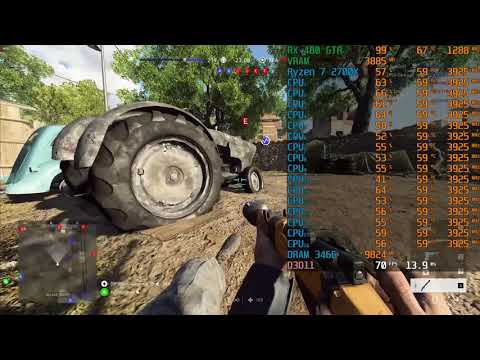
This is my clip back when i used the Ryzen 5 1600.

And this is the CPU usage for the Ryzen 7 2700X 8 core 16 thread, expect to see higher usage if you get more powerful GPU than mine.

Well that stands out as one of the stupidest answers I have read.
The OP has a 8700 lol
Also are you certain you don’t have issues with fps?

I found a dump in battlefield 5 folder. here is log from windbg ( WINDOWS ).

KEY_VALUES_STRING: 1

Key  : AV.Dereference
Value: NullClassPtr

Key  : AV.Fault
Value: Read

Key  : Analysis.CPU.Sec
Value: 1

Key  : Analysis.Elapsed.Sec
Value: 1

Key  : Analysis.Memory.CommitPeak.Mb
Value: 211

Key  : Timeline.Process.Start.DeltaSec
Value: 49516


PROCESSES_ANALYSIS: 1

SERVICE_ANALYSIS: 1

STACKHASH_ANALYSIS: 1

TIMELINE_ANALYSIS: 1

Timeline: !analyze.Start
Name: <blank>
Time: 2019-06-09T17:09:09.843Z
Diff: 664076843 mSec

Timeline: Dump.Current
Name: <blank>
Time: 2019-06-02T00:41:13.0Z
Diff: 0 mSec

Timeline: Process.Start
Name: <blank>
Time: 2019-06-01T10:55:57.0Z
Diff: 49516000 mSec


DUMP_CLASS: 2

DUMP_QUALIFIER: 400

MODLIST_WITH_TSCHKSUM_HASH:  ecae460c3b09697da4b7d808edddb7af9cabb419

MODLIST_SHA1_HASH:  b436539aa6f3750791d04ac1da7f12b3daf8b6e7

COMMENT:  Frostbite MiniDump. Address: 0000000145DE184D (In Windbg type: .ecxr)
[EOF]

NTGLOBALFLAG:  0

PROCESS_BAM_CURRENT_THROTTLED: 0

PROCESS_BAM_PREVIOUS_THROTTLED: 0

DUMP_FLAGS:  a2

DUMP_TYPE:  11

CONTEXT:  (.ecxr)
rax=00000000abd23ce0 rbx=00000000accc5820 rcx=0000000000000000
rdx=0000000000000000 rsi=000000000055fd80 rdi=0000000033fe2710
rip=0000000145de184d rsp=0000000033fe1a00 rbp=0000000033fe1be0
r8=0000000000000006  r9=0000000000000001 r10=0000000000000006
r11=0000000033fe1a68 r12=0000000000000000 r13=0000000000000000
r14=ffffffffffffffff r15=0000000000000000
iopl=0         nv up ei pl zr na po nc
cs=0033  ¯\_(ツ)_/¯=002b  ds=002b  es=002b  fs=0053  gs=002b             efl=00010246
bfv+0x5de184d:
00000001`45de184d 488b5238        mov     rdx,qword ptr [rdx+38h] ds:00000000`00000038=????????????????
Resetting default scope

FAULTING_IP: 
bfv+5de184d
00000001`45de184d 488b5238        mov     rdx,qword ptr [rdx+38h]

EXCEPTION_RECORD:  (.exr -1)
ExceptionAddress: 0000000145de184d (bfv+0x0000000005de184d)
ExceptionCode: c0000005 (Access violation)
ExceptionFlags: 00000000
NumberParameters: 2
Parameter[0]: 0000000000000000
Parameter[1]: 0000000000000038
Attempt to read from address 0000000000000038

DEFAULT_BUCKET_ID:  NULL_CLASS_PTR_READ

PROCESS_NAME:  bfv.exe

FOLLOWUP_IP: 
bfv+5de184d
00000001`45de184d 488b5238        mov     rdx,qword ptr [rdx+38h]

READ_ADDRESS:  0000000000000038 

ERROR_CODE: (NTSTATUS) 0xc0000005 - <Unable to get error code text>

EXCEPTION_CODE: (NTSTATUS) 0xc0000005 - <Unable to get error code text>

EXCEPTION_CODE_STR:  c0000005

EXCEPTION_PARAMETER1:  0000000000000000

EXCEPTION_PARAMETER2:  0000000000000038

WATSON_BKT_PROCSTAMP:  5047ff9c

WATSON_BKT_MODULE:  bfv.exe

WATSON_BKT_MODSTAMP:  5cdbc3d7

WATSON_BKT_MODOFFSET:  5de184d

WATSON_BKT_MODVER:  1.0.72.44435

BUILD_VERSION_STRING:  17763.1.amd64fre.rs5_release.180914-1434

ANALYSIS_SESSION_HOST:  DESKTOP-RVP2EUM

ANALYSIS_SESSION_TIME:  06-09-2019 19:09:09.0843

ANALYSIS_VERSION: 10.0.18869.1002 amd64fre

THREAD_ATTRIBUTES: 
OS_LOCALE:  PLK

BUGCHECK_STR:  APPLICATION_FAULT_NULL_CLASS_PTR_READ_NULL_CLASS_PTR_DEREFERENCE_INVALID_POINTER_READ

PRIMARY_PROBLEM_CLASS:  APPLICATION_FAULT

PROBLEM_CLASSES: 

ID:     [0n313]
Type:   [[@ACCESS_VIOLATION]](https://forums.battlefield.com/en-us/profile/ACCESS_VIOLATION%5D)
Class:  Addendum
Scope:  BUCKET_ID
Name:   Omit
Data:   Omit
PID:    [Unspecified]
TID:    [0xb30]
Frame:  [0] : bfv

ID:     [0n285]
Type:   [INVALID_POINTER_READ]
Class:  Primary
Scope:  BUCKET_ID
Name:   Add
Data:   Omit
PID:    [Unspecified]
TID:    [0xb30]
Frame:  [0] : bfv

ID:     [0n309]
Type:   [NULL_CLASS_PTR_DEREFERENCE]
Class:  Primary
Scope:  BUCKET_ID
Name:   Add
Data:   Omit
PID:    [Unspecified]
TID:    [0xb30]
Frame:  [0] : bfv

ID:     [0n310]
Type:   [NULL_CLASS_PTR_READ]
Class:  Primary
Scope:  DEFAULT_BUCKET_ID (Failure Bucket ID prefix)
BUCKET_ID
Name:   Add
Data:   Omit
PID:    [0x28cc]
TID:    [0xb30]
Frame:  [0] : bfv

IP_ON_HEAP:  0000000000400000
The fault address in not in any loaded module, please check your build's rebase
log at <releasedir>\bin\build_logs\timebuild\ntrebase.log for module which may
contain the address if it were loaded.

FRAME_ONE_INVALID: 1

LAST_CONTROL_TRANSFER:  from 0000000000400000 to 0000000145de184d

STACK_TEXT:  
00000000`33fe1a00 00000000`00400000 : 00000002`145b8ca0 00000000`0055fd80 00000002`188990d0 00000000`00000000 : bfv+0x5de184d
00000000`33fe1a08 00000002`145b8ca0 : 00000000`0055fd80 00000002`188990d0 00000000`00000000 00000000`00000000 : 0x400000
00000000`33fe1a10 00000000`0055fd80 : 00000002`188990d0 00000000`00000000 00000000`00000000 00000000`33fe2710 : 0x00000002`145b8ca0
00000000`33fe1a18 00000002`188990d0 : 00000000`00000000 00000000`00000000 00000000`33fe2710 00000001`45e11736 : 0x55fd80
00000000`33fe1a20 00000000`00000000 : 00000000`00000000 00000000`33fe2710 00000001`45e11736 00000000`00000006 : 0x00000002`188990d0


THREAD_SHA1_HASH_MOD_FUNC:  f86e706f3881ff99410f64522468510881cb97a0

THREAD_SHA1_HASH_MOD_FUNC_OFFSET:  fc53bee7bd5eee7c273e1f674a644f5504b35eba

THREAD_SHA1_HASH_MOD:  f86e706f3881ff99410f64522468510881cb97a0

FAULT_INSTR_CODE:  38528b48

SYMBOL_STACK_INDEX:  0

SYMBOL_NAME:  bfv+5de184d

FOLLOWUP_NAME:  MachineOwner

MODULE_NAME: bfv

IMAGE_NAME:  bfv.exe

DEBUG_FLR_IMAGE_TIMESTAMP:  5cdbc3d7

STACK_COMMAND:  ~16s ; .ecxr ; kb

FAILURE_BUCKET_ID:  NULL_CLASS_PTR_READ_c0000005_bfv.exe!Unknown

BUCKET_ID:  APPLICATION_FAULT_NULL_CLASS_PTR_READ_NULL_CLASS_PTR_DEREFERENCE_INVALID_POINTER_READ_bfv+5de184d

FAILURE_EXCEPTION_CODE:  c0000005

FAILURE_IMAGE_NAME:  bfv.exe

BUCKET_ID_IMAGE_STR:  bfv.exe

FAILURE_MODULE_NAME:  bfv

BUCKET_ID_MODULE_STR:  bfv

FAILURE_FUNCTION_NAME:  Unknown

BUCKET_ID_FUNCTION_STR:  Unknown

BUCKET_ID_OFFSET:  5de184d

BUCKET_ID_MODTIMEDATESTAMP:  5cdbc3d7

BUCKET_ID_MODCHECKSUM:  ef4e508

BUCKET_ID_MODVER_STR:  1.0.72.44435

BUCKET_ID_PREFIX_STR:  APPLICATION_FAULT_NULL_CLASS_PTR_READ_NULL_CLASS_PTR_DEREFERENCE_INVALID_POINTER_READ_

FAILURE_PROBLEM_CLASS:  APPLICATION_FAULT

FAILURE_SYMBOL_NAME:  bfv.exe!Unknown

TARGET_TIME:  2019-06-02T00:41:13.000Z

OSBUILD:  17763

OSSERVICEPACK:  475

SERVICEPACK_NUMBER: 0

OS_REVISION: 0

SUITE_MASK:  256

PRODUCT_TYPE:  1

OSPLATFORM_TYPE:  x64

OSNAME:  Windows 10

OSEDITION:  Windows 10 WinNt SingleUserTS

USER_LCID:  0

OSBUILD_TIMESTAMP:  1989-09-10 08:58:46

BUILDDATESTAMP_STR:  180914-1434

BUILDLAB_STR:  rs5_release

BUILDOSVER_STR:  10.0.17763.1.amd64fre.rs5_release.180914-1434

ANALYSIS_SESSION_ELAPSED_TIME:  76d

ANALYSIS_SOURCE:  UM

FAILURE_ID_HASH_STRING:  um:null_class_ptr_read_c0000005_bfv.exe!unknown

FAILURE_ID_HASH:  {f476daa4-68b6-2895-45dc-838c7fe6b3de}
Followup:     MachineOwner
---------

0:016> !analyze -v
*****
***                                                                             ***
***                        Exception Analysis                                   ***
***                                                                             ***
*


KEY_VALUES_STRING: 1

Key  : AV.Dereference
Value: NullClassPtr

Key  : AV.Fault
Value: Read

Key  : Analysis.CPU.Sec
Value: 1

Key  : Analysis.Elapsed.Sec
Value: 1

Key  : Analysis.Memory.CommitPeak.Mb
Value: 219

Key  : Timeline.Process.Start.DeltaSec
Value: 49516


PROCESSES_ANALYSIS: 1

SERVICE_ANALYSIS: 1

STACKHASH_ANALYSIS: 1

TIMELINE_ANALYSIS: 1

Timeline: !analyze.Start
Name: <blank>
Time: 2019-06-09T17:09:11.746Z
Diff: 664078746 mSec

Timeline: Dump.Current
Name: <blank>
Time: 2019-06-02T00:41:13.0Z
Diff: 0 mSec

Timeline: Process.Start
Name: <blank>
Time: 2019-06-01T10:55:57.0Z
Diff: 49516000 mSec


DUMP_CLASS: 2

DUMP_QUALIFIER: 400

MODLIST_WITH_TSCHKSUM_HASH:  ecae460c3b09697da4b7d808edddb7af9cabb419

MODLIST_SHA1_HASH:  b436539aa6f3750791d04ac1da7f12b3daf8b6e7

COMMENT:  Frostbite MiniDump. Address: 0000000145DE184D (In Windbg type: .ecxr)
[EOF]

NTGLOBALFLAG:  0

PROCESS_BAM_CURRENT_THROTTLED: 0

PROCESS_BAM_PREVIOUS_THROTTLED: 0

DUMP_FLAGS:  a2

DUMP_TYPE:  11

CONTEXT:  (.ecxr)
rax=00000000abd23ce0 rbx=00000000accc5820 rcx=0000000000000000
rdx=0000000000000000 rsi=000000000055fd80 rdi=0000000033fe2710
rip=0000000145de184d rsp=0000000033fe1a00 rbp=0000000033fe1be0
r8=0000000000000006  r9=0000000000000001 r10=0000000000000006
r11=0000000033fe1a68 r12=0000000000000000 r13=0000000000000000
r14=ffffffffffffffff r15=0000000000000000
iopl=0         nv up ei pl zr na po nc
cs=0033  ¯\_(ツ)_/¯=002b  ds=002b  es=002b  fs=0053  gs=002b             efl=00010246
bfv+0x5de184d:
00000001`45de184d 488b5238        mov     rdx,qword ptr [rdx+38h] ds:00000000`00000038=????????????????
Resetting default scope

FAULTING_IP: 
bfv+5de184d
00000001`45de184d 488b5238        mov     rdx,qword ptr [rdx+38h]

EXCEPTION_RECORD:  (.exr -1)
ExceptionAddress: 0000000145de184d (bfv+0x0000000005de184d)
ExceptionCode: c0000005 (Access violation)
ExceptionFlags: 00000000
NumberParameters: 2
Parameter[0]: 0000000000000000
Parameter[1]: 0000000000000038
Attempt to read from address 0000000000000038

DEFAULT_BUCKET_ID:  NULL_CLASS_PTR_READ

PROCESS_NAME:  bfv.exe

FOLLOWUP_IP: 
bfv+5de184d
00000001`45de184d 488b5238        mov     rdx,qword ptr [rdx+38h]

READ_ADDRESS:  0000000000000038 

ERROR_CODE: (NTSTATUS) 0xc0000005 - <Unable to get error code text>

EXCEPTION_CODE: (NTSTATUS) 0xc0000005 - <Unable to get error code text>

EXCEPTION_CODE_STR:  c0000005

EXCEPTION_PARAMETER1:  0000000000000000

EXCEPTION_PARAMETER2:  0000000000000038

WATSON_BKT_PROCSTAMP:  5047ff9c

WATSON_BKT_MODULE:  bfv.exe

WATSON_BKT_MODSTAMP:  5cdbc3d7

WATSON_BKT_MODOFFSET:  5de184d

WATSON_BKT_MODVER:  1.0.72.44435

BUILD_VERSION_STRING:  17763.1.amd64fre.rs5_release.180914-1434

ANALYSIS_SESSION_HOST:  DESKTOP-RVP2EUM

ANALYSIS_SESSION_TIME:  06-09-2019 19:09:11.0746

ANALYSIS_VERSION: 10.0.18869.1002 amd64fre

THREAD_ATTRIBUTES: 
OS_LOCALE:  PLK

BUGCHECK_STR:  APPLICATION_FAULT_NULL_CLASS_PTR_READ_NULL_CLASS_PTR_DEREFERENCE_INVALID_POINTER_READ

PRIMARY_PROBLEM_CLASS:  APPLICATION_FAULT

PROBLEM_CLASSES: 

ID:     [0n313]
Type:   [[@ACCESS_VIOLATION]](https://forums.battlefield.com/en-us/profile/ACCESS_VIOLATION%5D)
Class:  Addendum
Scope:  BUCKET_ID
Name:   Omit
Data:   Omit
PID:    [Unspecified]
TID:    [0xb30]
Frame:  [0] : bfv

ID:     [0n285]
Type:   [INVALID_POINTER_READ]
Class:  Primary
Scope:  BUCKET_ID
Name:   Add
Data:   Omit
PID:    [Unspecified]
TID:    [0xb30]
Frame:  [0] : bfv

ID:     [0n309]
Type:   [NULL_CLASS_PTR_DEREFERENCE]
Class:  Primary
Scope:  BUCKET_ID
Name:   Add
Data:   Omit
PID:    [Unspecified]
TID:    [0xb30]
Frame:  [0] : bfv

ID:     [0n310]
Type:   [NULL_CLASS_PTR_READ]
Class:  Primary
Scope:  DEFAULT_BUCKET_ID (Failure Bucket ID prefix)
BUCKET_ID
Name:   Add
Data:   Omit
PID:    [0x28cc]
TID:    [0xb30]
Frame:  [0] : bfv

IP_ON_HEAP:  0000000000400000
The fault address in not in any loaded module, please check your build's rebase
log at <releasedir>\bin\build_logs\timebuild\ntrebase.log for module which may
contain the address if it were loaded.

FRAME_ONE_INVALID: 1

LAST_CONTROL_TRANSFER:  from 0000000000400000 to 0000000145de184d

STACK_TEXT:  
00000000`33fe1a00 00000000`00400000 : 00000002`145b8ca0 00000000`0055fd80 00000002`188990d0 00000000`00000000 : bfv+0x5de184d
00000000`33fe1a08 00000002`145b8ca0 : 00000000`0055fd80 00000002`188990d0 00000000`00000000 00000000`00000000 : 0x400000
00000000`33fe1a10 00000000`0055fd80 : 00000002`188990d0 00000000`00000000 00000000`00000000 00000000`33fe2710 : 0x00000002`145b8ca0
00000000`33fe1a18 00000002`188990d0 : 00000000`00000000 00000000`00000000 00000000`33fe2710 00000001`45e11736 : 0x55fd80
00000000`33fe1a20 00000000`00000000 : 00000000`00000000 00000000`33fe2710 00000001`45e11736 00000000`00000006 : 0x00000002`188990d0


THREAD_SHA1_HASH_MOD_FUNC:  f86e706f3881ff99410f64522468510881cb97a0

THREAD_SHA1_HASH_MOD_FUNC_OFFSET:  fc53bee7bd5eee7c273e1f674a644f5504b35eba

THREAD_SHA1_HASH_MOD:  f86e706f3881ff99410f64522468510881cb97a0

FAULT_INSTR_CODE:  38528b48

SYMBOL_STACK_INDEX:  0

SYMBOL_NAME:  bfv+5de184d

FOLLOWUP_NAME:  MachineOwner

MODULE_NAME: bfv

IMAGE_NAME:  bfv.exe

DEBUG_FLR_IMAGE_TIMESTAMP:  5cdbc3d7

STACK_COMMAND:  ~16s ; .ecxr ; kb

FAILURE_BUCKET_ID:  NULL_CLASS_PTR_READ_c0000005_bfv.exe!Unknown

BUCKET_ID:  APPLICATION_FAULT_NULL_CLASS_PTR_READ_NULL_CLASS_PTR_DEREFERENCE_INVALID_POINTER_READ_bfv+5de184d

FAILURE_EXCEPTION_CODE:  c0000005

FAILURE_IMAGE_NAME:  bfv.exe

BUCKET_ID_IMAGE_STR:  bfv.exe

FAILURE_MODULE_NAME:  bfv

BUCKET_ID_MODULE_STR:  bfv

FAILURE_FUNCTION_NAME:  Unknown

BUCKET_ID_FUNCTION_STR:  Unknown

BUCKET_ID_OFFSET:  5de184d

BUCKET_ID_MODTIMEDATESTAMP:  5cdbc3d7

BUCKET_ID_MODCHECKSUM:  ef4e508

BUCKET_ID_MODVER_STR:  1.0.72.44435

BUCKET_ID_PREFIX_STR:  APPLICATION_FAULT_NULL_CLASS_PTR_READ_NULL_CLASS_PTR_DEREFERENCE_INVALID_POINTER_READ_

FAILURE_PROBLEM_CLASS:  APPLICATION_FAULT

FAILURE_SYMBOL_NAME:  bfv.exe!Unknown

TARGET_TIME:  2019-06-02T00:41:13.000Z

OSBUILD:  17763

OSSERVICEPACK:  475

SERVICEPACK_NUMBER: 0

OS_REVISION: 0

SUITE_MASK:  256

PRODUCT_TYPE:  1

OSPLATFORM_TYPE:  x64

OSNAME:  Windows 10

OSEDITION:  Windows 10 WinNt SingleUserTS

USER_LCID:  0

OSBUILD_TIMESTAMP:  1989-09-10 08:58:46

BUILDDATESTAMP_STR:  180914-1434

BUILDLAB_STR:  rs5_release

BUILDOSVER_STR:  10.0.17763.1.amd64fre.rs5_release.180914-1434

ANALYSIS_SESSION_ELAPSED_TIME:  76d

ANALYSIS_SOURCE:  UM

FAILURE_ID_HASH_STRING:  um:null_class_ptr_read_c0000005_bfv.exe!unknown

FAILURE_ID_HASH:  {f476daa4-68b6-2895-45dc-838c7fe6b3de}

Followup:     MachineOwner
---------

Ive now done a clean install of Windows using BIOS secure erase. As soon as I got it done I downloaded Latencymon via windows edge browser so that I wouldn’t have anything else bloating my PC when testing. I also tried to “update” BIOS to an older version just in case the new one is flawed. Result is the same, nothing have changed.

So what should be my next step? Buy a new motherboard? Please answer only if you know what you’re talking about. :slight_smile:

UP UP UP

The fix can’t arrive soon enough. I hope they patch it before my new gpu arrives.

Yeah, so it looks like a bug of some kind. You had it running for 18 hours, so its not surprising.

To be sure i made memtest86 8.2 from uefi bootable USB for 4 passes, no errors. Also program called “RAM TEST” and overnight no errors :slight_smile:

Yeah what can happen is some kind of allocation error. So memory is created, then destroyed, possibly by another program (maybe even windows) and BF V tried to dereference unallocated memory. Which lead to the crash. If you’re not seeing the issue happen anymore, then i wouldnt worry about it.

If it continues to happen, the solution is to simply close BF V when you’re not using it.

Is your memory profile set to [email protected] In bios? Or is it manual? You put the memory in the right slots? It could be memory throughput that’s holding you back, but i doubt it. That’s only slightly worse than my system at the same frequency. You could try switching slots to see if anything improves, just to rule out hardware.

Try putting the game on 4 or 5 cores instead of 6. See if anything improves.

Does it do this in single player aswell or just multiplayer? Network issues wouldn’t show up as frame spikes. That’s noticeable lag on screen. However, if the network driver is a problem, that could cause issues w/ the CPU.

W/ latencymon, make sure you run it after you’ve loaded the game and have been in game for a time. Game loads via disk access can lead to it saying that. If you did that and it still says it, then you’d have to find out why it says that. Check the other tabs for mor einformation. Specifically the conclusion and below that. Look for ISRs and DPCs that are flagged or are running longer than 250 ms. Second time down can be enough to cause issues.

Also paging can indicate disk access. check that out aswell.

The DPC count is supposed to go up and up forever. It goes up as long as you’re running the program and latencymon is tracking it. What matters is the time it takes.

Post the conclusion if you can.

If you plugged in your monitor to the motherboard, then the issue goes away due to it running off a different graphics card. It may be a driver issue. Have you done a clean install of your drivers? If so, you can also try to revert back a driver or two.

Neither does my friend who plays on 9600k. Its just the game that runs like deep Pre-Alpha state trash.