To all of you who think it’s not normal that CPU usage is 100%, even on the fastest processer like the 9700K, it’s perfectly normal.
By default, they changed the amount of threads the game uses to 11. So unless you have a CPU that has more then 12 threads ( Example: 9900K, Ryzen 2700x ), the game can use up to 92-100% CPU.
Now, normally that’s not an issue. It only becomes an issue when the remaining CPU power 0-8% is not able to run all other background tasks efficiently.
I tried turning SMT off, I tried changing CPU affinity. The game will always use 11 threads unless you manually change it with a config file.
For example, I game and stream on the same PC. I noticed lag in my stream in BF V that I didn’t had in BF1 at default config settings. Simply because not only the amount of threads the game uses are higher by default, but the actual CPU usage of every thread is also higher then in BF1 due to some optimazations. Yes, I say optimization because the performance difference per thread is bigger then in BF1 ( up to a 8 threads ) while in BF1, I could limit the amount of threads the game uses to 4, and the game would still run at the exact same framerate on my CPU. Now that also has to do witht he fact that I play higher then 1080p, limiting the impact off the CPU on the framerate. Al I had to do in Battlefield V is limit the amount of threads the game uses from 11 to 10, making all remaining 6 threads ( I have a Ryzen 2700x ) available for encoding, and the lag in my stream was gone without any drop in FPS ingame.
So if the CPU usage is 100%, and you have no issues, leave it be.
If your CPU usage is 100% and you notice serious framedrops, add these commands to a user.cfg file and lower the amount untill you notice the issue’s are gone.
thread.processorcount x
thread.maxprocessorcount x
x = between 4 and 10, without the command, default setting is 12 wich results in 11 actual threads
It’s easy to see if it worked, because if you change this to 6, an 8700K user should see his CPU usage drop to 50% but that will result in a drop in framerate, since the game really works well on 8 thread and above.
Now, because the game is so optimized, the actual corespeed does not impact impact the overal performance as much. You might think that, because all reviewers are currently using the 2080ti to review BF V performance and not slower cards. They also test CPU performance on 720p or 1080p as if nobody is playing on a higher resolution scale. But if you are playing on a higher resolution scale, or on 1440p or higher, the results might suprise you:
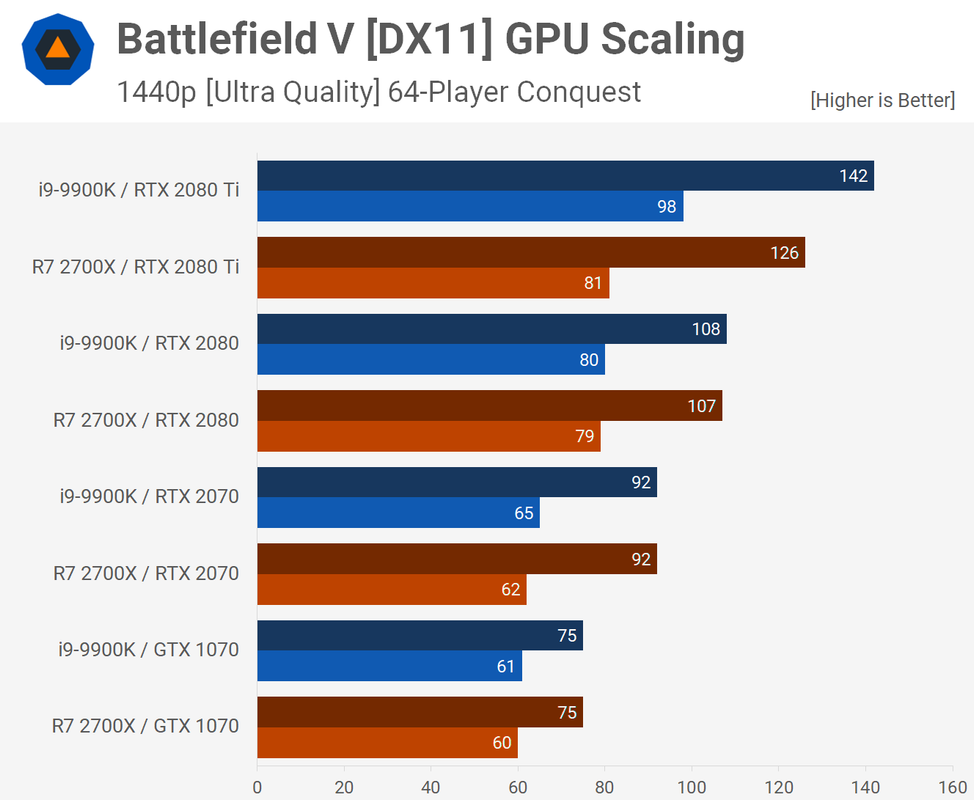
Source: techspot.com
So basicly, since my card is performing as a GTX 2070, there would be no difference between my Ryzen 2700x ( 330 USD ) clocked at 4Ghz and the 9900K ( 550 USD ) clocked at 4.7Ghz.
Important to notice is that these tests were performed on Ultra. Lowering to high, medium or low will increase the difference you see between the 9900K and the Ryzen 2700x. Sadly this hasn’t been tested before on BF V, but I’m sure the results will be simular to older tests on BF1.
Now keep in mind that core/thread scaling is not 100% the same on Intel and AMD cpu’s. Also, there are many other possible causes for framedrops. All I’m saying is that you don’t have to worry about high usage or high temperatures, as long as this doesn’t result in any issues.
 Lets be honest, the game is a pig, but it’s also a beautiful, smooth, amazing game from an engine standpoint. No other series out there compares.
