You said no stutter in 8.1 ,can we play in compatibility mode in windows 8 while we are in windows 10?
Don’t know man, I think the problem is anything related to Windows 10 CU Core and Nvidia Drivers
Anybody else noticed that even when Afterburner tells you are running the game at 60fps the whole time, you do have noticeable framedrops? Same thing when i activate the fps count on screen (perfoverlay.drawfps 1).
Am running the game on windows 7, 16gb of ram, i7 4790, gtx 970.
Hi everyone. I have Radeon RX470 4GB + i5 7500 + 8 GB DDR 4 2400 Mhz and I really have no idea why i’m getting fps drops in BF1. As I remember when beta launched there was no problem with fps at all. I’m playing on Windows 10 with CU. Additionally what is really strange I can’t reach more than 60 fps (I thought that this is caused by frame limit parameter). Any ideas ?
I confirm, problem solved.
That’s why I’m also a fan battlefield : DICE has always very well optimized battlefield, excellent.
Yesterday I had terrible fps drops again especially when confronting enemies. I always thought that they were server related, because after changing server those fps issues have usually vanished. But this time fps problem didn’t go away, finally I went to task manager and changed BF1 priority to High, but mouse started to act up. Changed priority to AboveNormal and fps seemed to be fine after that. So apparently problem is caused by something else. Strange enough because CPU usage is 0% when I start playing but apparently there’s something using CPU recources during game.
Can anyone else confirm this too? Didn’t entered the game today.
For me the game is the SAME after this last update, shuttering and fps drops, I desinstalled the game! I don’t have more patience with this game!
Hello,
I have strange problem in BF1, I am playing fine for like 10 minutes with stable fps (like 60) and then it is dropping to 15-20, I have found out that GPU usage after some time is going down to 20% instead of 100-90% anyone knows where can be problem??
My rig
GTX 1050 ti 4gb gigabyte
AMD 8320 FX
HyperX DDR3 8GB
Corsair SV 550W
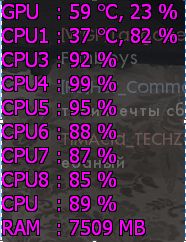
Screen here
Same problem here! Dunno why, I am facing a lot of random Frame drops! I started again to play after a long absence period, it could be due to the last updates?
What Mainboard and CPU-Cooler did you have? This sounds for me like the very well known AMD-FX Problem with overheating VRMs. Please look in the manufacturers homepage to read, which CPUs where supported by them. Often you will need a good Top-Blower to cool the CPU and it’s surrounding components. A first fix will be to deactivate the AMD-Turbo, a second can be to place a fan to blow in the open case from the side. You will have then a few fps Löwen, but they should become stable. Independent from this you are also near the CPU-Limit.
This sounds like the well known AMD-FX problem. What mainboard did you have and is the CPU supported by it? If yes, is a Top-Blower needed for the cooling of the CPU and it’s surrounding components? To test this, you should deactivate the AMD-Turbo and place a fan to blow in the opened case. Regarding your screenshot you are near the CPU-limitation / near full CPU-Load.
Because 7.5gb of RAM means you are swapping with the hard drive affecting your FPS
Well my mobo is ASrock 960 GC-GS FX, and yes i have cooling component for cpu. SilentiumPC Spartan Pro … I do not really know where is the problem  it is strange other games are working damn good on this pc but bf1 is just annoying while dropping fps..
Sorry but you understand it wrong. You need a CPU cooler with a top blow design. You have one with a normal blowing design. Please google for AMD FX VRM problems. Near all ASRock AM3+ socket boards are affected of this. Your VRMs could not hold the CPU clock permanently and will throttle down to 1,4GHz.
Please translate the first post of the following thread with google into english. This is from one of our hugest forums for computers in german and describes this very known problem.
https://www.computerbase.de/forum/showthread.php?t=1645078
Really a lot of people have the same problem of mine. More than 100 hours without any problem, and now it is very annoying to have this fram drop..
Hope DICE will release a new patch soon..
Yes but this is a problem with the game itselfs and I hope this will be patched soon too.
But the problem of bamboBJJ should be the very well known ASROCK VRM problem in combination with AMD FX 8xxx series CPUs.
Do you suggest then changing mobo?? I would just love to play this game so stable…
I seriously have hours on troubleshooting this game when it came out because every problem i had. But with my setup i don’t have any problems. I recommend trying to lower your in-game settings or downclocking your CPU (if bottlenecked).
I suggest you have a look at his post once again, since it already contains a suggestion.
Though your motherboards power delivery doesnt really seem up to the task either.