cleaning my registers
setup low/hight graphics option in the game
reinstall game
updated firmware on my router
try to conncect in the game with wireless or cable conection (Router-PC)
turn on/off the function in my router called QoS
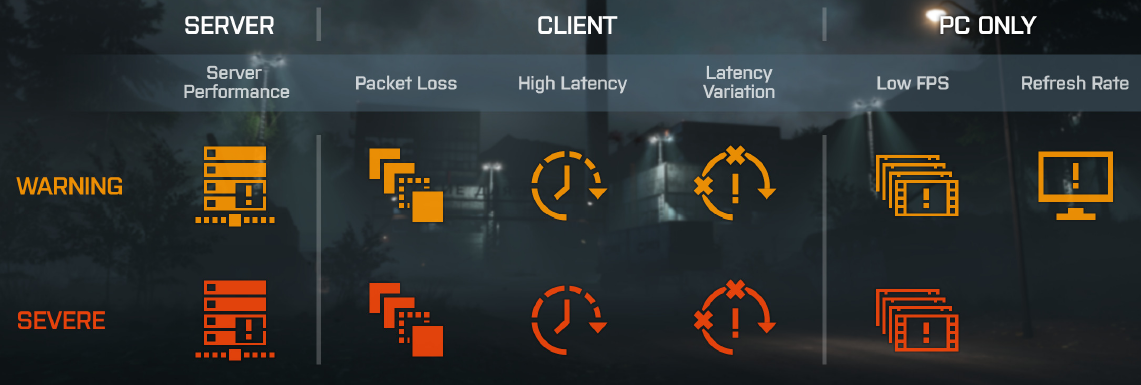
during the playing BF1 I have stable 80± FPS but it´s still lagging to me. (only when the icons are on the screen)
I am having the same problem. I’m currently playing in the Oceanic Server (Melbourne, Australia). It is fine for the first 2-3mins into the game, then all of a sudden the ping goes through the roof. Constant 999, with those icons keep appearing and disappearing. I’ve tried changing to low-setting, but it didn’t solve the problem. There seems to be no solution to the problem at all. I think I might as well stop playing the game at this rate.
LINK TO MY POST: forums.battlefield.com/en-us/discussion/40720/issue-high-ping-999-every-game
I have those flickering off and on quite a bit. I’m in the US and play on US servers but my mountain internet is notoriously unstable. It’s common for my ping to be in the 30’s then spike to several hundred for a couple of minutes then drop back down. I don’t even look at those warning symbols anymore, since there isn’t much I can do with it.
This problems seems to happen worldwide! I play in South America Servers where I got 24 ms ±2 on a fiber connection and sometimes I see those icons, the Warning Packet Loss and also Latency Variation!
I Have the same issue.
Upgraded my Core i5 3570K processor 16 GB RAM Windows 10 and SSD PC with a MSI RX 480 Gaming Graphics card and I am still getting frame rate warnings.
Tried lowering settings and a makes not difference. Am really getting peed of with this after spending £250 for a new graphics card. Just updated with latest AMD drivers and no difference
Turn them off ??? Sigh… gamers today has no clue at all, the Icons are actually there for a reason.
OP has Packet loss and latency variations , not good at all for the game play.
The third icon has to do with what FPS number you have set in your game and if your computer is able to put out that amount, if you have a 120 or 144 hz monitor you might have set the resoultion to, let say 1920*[email protected]
I guess you want to play at as much frame rate as possible so tone down some of the eyecandy, leave mesh quality and anisotropic filtering on ultra though.
And if you play on DX12 try out DX11 because for some reason DX12 in this game is kind of wonky.
ALLWAYS wired to your router, but maybe check your TP cable for damage.
What connection do you have to your ISP ? ADSL , Fiber ?
And are there others sharing your connections, maybe streaming from youtube or other services at the same time.
Try this and check your connection http://www.dslreports.com/speedtest
Hello Battlefield 1 players,
first of all i got this problem for a long time with this specs:
CPU: core I7 6700k
GPU: EVGA GeForce gtx 1080
RAM: 16GB RAM
I can run every game on ultra with no lags and just battlefield MP was unplayeable. I was very upset because the game is so brilliant.
I tried lowering everything but it didnt work for me . Finally i got a solution for that problem.
I turned on Vsync and set fps limiter to 60. That worked out so far and i am so glad. Now i can play in peace and with no lags, just smooth gameplay.
This Thread is older but i think there are many people out there who still got this problem.
The rest of the icons idk maybe some server lags or your connection.
I hope i can help.
Same so I set them not to display. Playing just fine, no lag or issues.
If you’re having issues in game, lag and such check into it if you’re playing just fine Ignore them.
The symbols are not the problem, they are telling you your link sux… packet loss with slow network response lead to crappy FPS. Check your network is good from NIC to router. Others mentioned ping: High ping is bad.
I have never had a problem with rubber banding until today.. I have not played in a week… figuring Dice “fixed it worse” which has been known to happen tonight the game has just been unplayable.. look at everyone’s lag and looks like everyone is having lag spikes in the games that i have been in..