Everytime, when i start the game my setting are reset. I Must set Brightness and everything. Then i must wait for the intro, over and over again.
i have not had that issue  sounds abit wierd.
Same to me. It happened when i was playing the open data, and it happened again.
I get some of my settings reset, like vignete blur etc few times in a row. But other like fov stayed same
same here
do something dice!
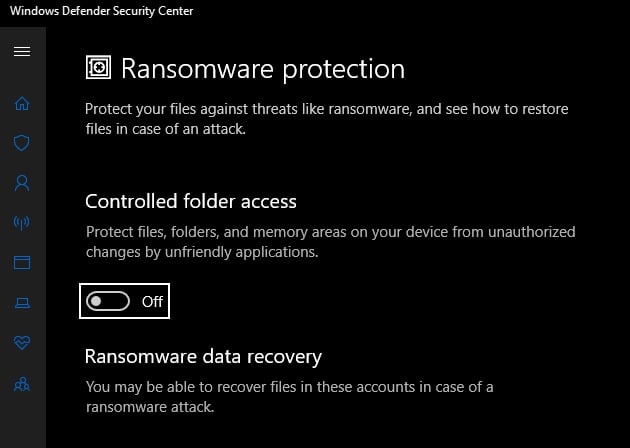
Battlefield V saves the settings in the Documents\BattlefieldV folder. Antivirus, security programs or user settings can all block the access for BFV to create or edit these files. The most typical one is the Windows 10 setting → “Controlled folder access”:
You want it to be off or allow Origin + BFV (bfv.exe and bfvtrial.exe) through.

unfortunately it doesnt help me.
in my case, it was off already.
That’s just the most likely cause. Other things can block as well, like security programs or something could have changed the folder permissions, your windows user permissions or the Origin/BFV application permission.
I have the same problem and i don’t know how to deal with this problem
same issue here! Any solution, this is really annoying.. -_-
Same here. I tried everything, but nothing helped. Tried to repair the game, to run Origin and BFV as an Admin, changing the Battlefield V folders to NOT Read-Only (however it will be changed back every time I do this, to “Read-Only”). It’s really annoying, and it is only happening with Battlefield V, and happened with the Open Beta as well. If anyone have a solution, make sure to post it here.
You might want to try making a different Windows user for the system and playing with that.
everyone who is suffering this issue should go to EA help and talk to EA represents to let them know this problem.https://help.ea.com/en/
Same here. Had this problem in beta and now with a totally new PC. Dicepls!
Launch the game, set all your settings, quit the game.
Go to C:\Users\Yourname\Documents\Battlefield V\settings, delete the “_tmp” of the “PROFSAVE_tmp” file.
Launch the game and check, it should work.
You would have to it every time you change your settings if you want them to be saved the next time you launch the game.
Make sure that BFV is allowed/exempt through your firewall and AV. I have seen some instances where a player was able to play however the firewall/AV was blocking the game from editing/saving the settings to a file.
-CB
Cheers! It worked like a charm. Seems like this is a problem since BF1. Upvoted
But now DICE should find out why it does this, and why can’t it save over the file without “_temp”
Yeah it seems when i play from my online microsoft account the game doesn’t save settings or story progression i play from a local user account and it seems fine
That could be because OneDrive or similar interfers. Does the online account work if you disable Onedrive?
I solved it.
one drive was a problem. just uncheck ‘my document’ of one drive setting.
thank you all guys! 