Installing BetterBattlelog and TruePlayerCounts, the right way.
.
**1.**Which browser you want to use? For Chrome, continue to 1a. For FireFox, go to 1b.
.
.
**2.**Restart your browser.
.
**3.**Go to https://battlelog.battlefield.com
.
**4.**Hoover your mouse over the new slider that appears on the left side of your screen. (example below).
.

.
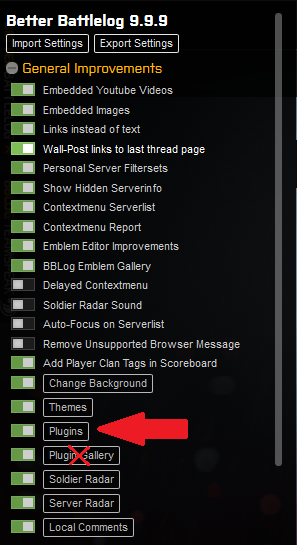
**5.***The settings tab appears. Click on the Plugins button within the settings tab of BBlog *(not the Plugin Gallery tab! Example below).
.
.
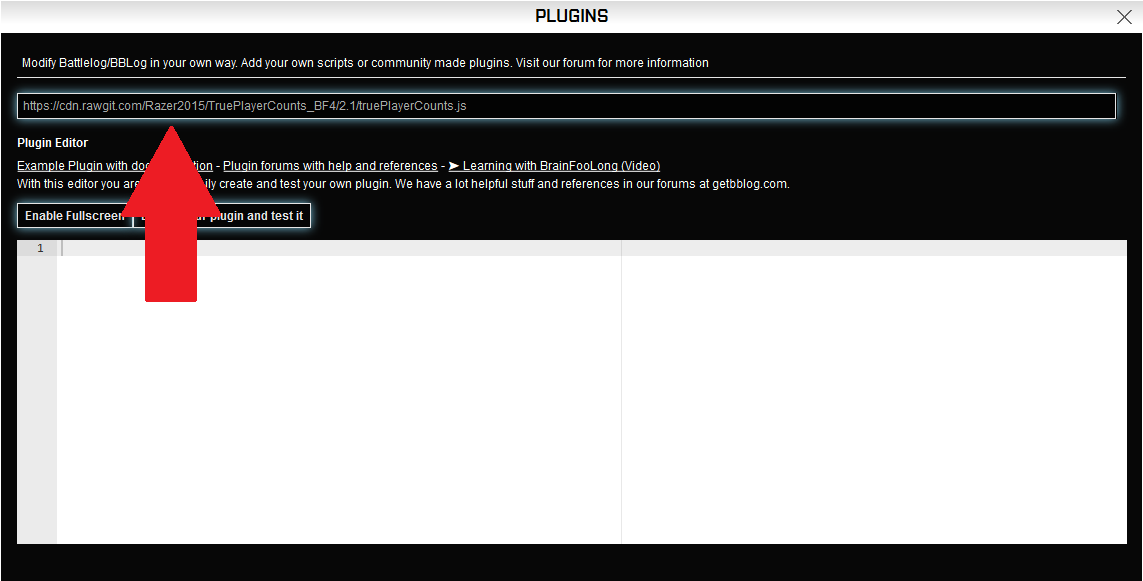
**6.**Copy the following line: https://cdn.rawgit.com/Razer2015/TruePlayerCounts_BF4/master/truePlayerCounts.js and paste it within the black input field. (example below)
.
.
**7.**Press enter and refresh your browser. You are all done now!
.
.
.
.
Thanks @xfileFin for this fix!
Source: GitHub - Razer2015/TruePlayerCounts_BF4 · GitHub
.