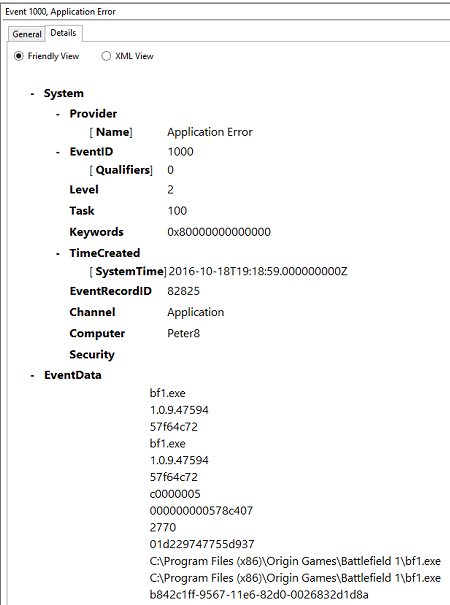
“Battlefield 1 has stopped working”. Every time I try to play it. I have tried a bunch of things, but always the behavior is the same. Am trying to use EA support but the English communication skills are pretty poor and make it difficult to understand what they are saying. Perhaps the forums will be a better bet.
I have a core i7, Win8.1 x64, GTX1080, with latest Geforce Experience and drivers. I have a Gsync monitor. Pretty frustrating that I spent like $1500 upgrading my rig for this game and now it’s the one game that doesn’t work.
I have uninstalled and re-installed BF1 as well as Origin.
I have played with various options like Origin in-game, compatibility mode, run as admin, command line arguments, etc. Nothing changes.
I have a similar issue, only I can play the game, it crashes after 10 to 20 minutes of gameplay. Seems to be related to the dxgi.dll in sys32? I’ve no idea how to fix it though.
I have the exact same issue. I open the game and it says that something has caused the program to stop working. I’ve uninstalled and then reinstalled BF1 two times, and then I deleted origin and reinstalled that and it still hasn’t fixed anything. I have a friend that has the exact same build for a pc and he has no problem, but I seem to have the worst problem. I can only open BF1 after endless attempts at opening it and sometimes it’ll say 0% of game installed, which starts the whole process back over. I’ve put in 3 tickets in the last three days, and I have yet to receive a response from support. I just find it really frustrating that I buy the Ultimate Edition and I can only play it by hoping that the game will launch properly.
I was having problems launching the game and keeping the game launched while having afterburner running. If you run BG1 in dx12 mode it will not work with afterburner. If BF1 is in dx11 mode, it will run, but I have experienced random problems while afterburner is running. If I turn off afterburner, I can run BF1 any way I want to. If you are not using afterburner, check that you don’t have any other program that taps into directx in some way.
Same here. Spent over £1000 to upgrade my system only for Battlefield 1. The game worked for a while, then started getting an error, now it will not start at all. It loads the same MB’s of memory, then freezes and use 14% cpu, just a black frozen screen.
Tried repairing the game, repairing VC Redist, turned off origin in-game, updated drivers etc…
Sadly, I can not return the hardware to get my money back.
UPDATE YOUR DRIVERS!!! AMD and NVidia made new updates specifically for BF1! I had this problem and tried literally EVERYTHING. But after I went and updated my gpu and all other drivers, the game opened in the same window as before but instead of going black and saying, “Battlefield 1 has stopped working” , The game loaded and I played it!!! PLEASE UPDATE YOUR DRIVERS. AMD released knew driver 16.10.2 specifically for BATTLEFIELD 1.
I bought the Early Enlister edition and was very disappointed when it didn’t work. But my friend told me
To update my DRIVERS and it worked.
I was having this issue, I have a gigabyte g1 1080 and it was the xtreme gigabyte software what was causing the “battlefield has stopped working” on launch once I uninstalled the gigabyte software it solved the issue.
Hello!!!. I had the same problem and I turned off sonic suite and presto! it now launches!
Hope this works for you, if not you can locate the SAVEPROF files for BF1 and drag them to your desktop and this will work but it’s not a long-term fix!.
I had the same issue and contacted EA and gave them my pc specs and they found a conflicting .dll file which belonged to some asus software…after switching off SONIC SUITE2 the game launched no problem…wish i had known this before uninstalling and re downloading the game!..we live and learn, take your time.
I’m Having the same issue nothing but crashes I’ve tried everything I can think of with no resolve I can run the single player for about 10 mins and then I get battlefield 1 has stopped working and I can’t even load into a multiplayer map without getting Battlefield 1 has stopped working I’m beyond frustrated customer support was zero help