Anybody here knows a software i can download, to check in real time, what % of CPU and GPU is being used? And it’s clock speed etc?
Thanks
Anybody here knows a software i can download, to check in real time, what % of CPU and GPU is being used? And it’s clock speed etc?
Thanks
MSI Afterburner.
That ^
There are also other apps you can use.
I dont know the names of them but look for real time CPU usage apps
Hwinfo64 is the best one to use and you cam configure it for on screen display with riva tuner
take a look on guru3d. all upto date progs. I’m sure you’ll find what your looking for there .
Thanks for all the answers
Intel Extreme Tuning Utility is really good at keeping track of what your cpu is doing, and it will draw a graph for you while you game but you’ll have to minimize the game to view it.
Can anyone tell me why afterburner with rivatuner doesnt show ingame? tried running both as admin, nothing works, and i’ve installed the lastest rivatuner
you need to set the OSD setting in the program to show a display ingame.
start the msi afterburner.
go to the setting options on the display.(cog wheel icon)
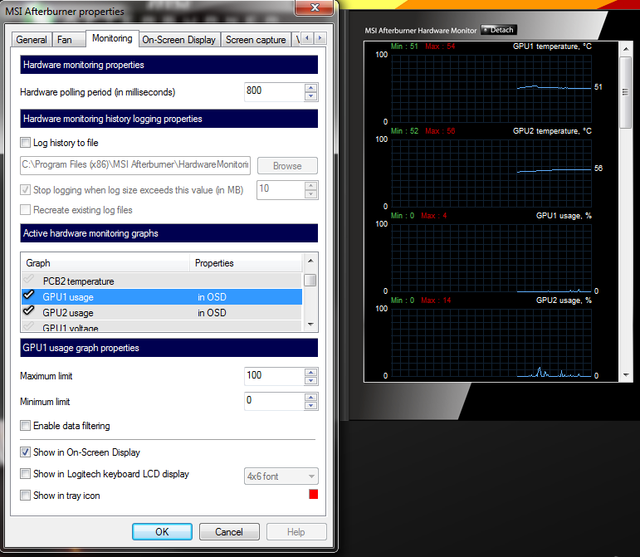
then select the monitor tab
all the options are there that you need to select… take ya pick.
oh ps.. the on screen display tab give you the option to toggle on/off in game display. just set your pref there.
I’ve already selected the things i want to be shown and set the key bindings for toggle, but it still doesnt work :s detection is set to high in rivatuner
funny.. I havn’t put afterburner on for a while, and it didn’t show when I just tried now.. I had altered some bindings on my mouse buttons for BFV.. and it seems to have changed the display afterburner toggle. just reassigned in afterburner now and all works again. Strange.
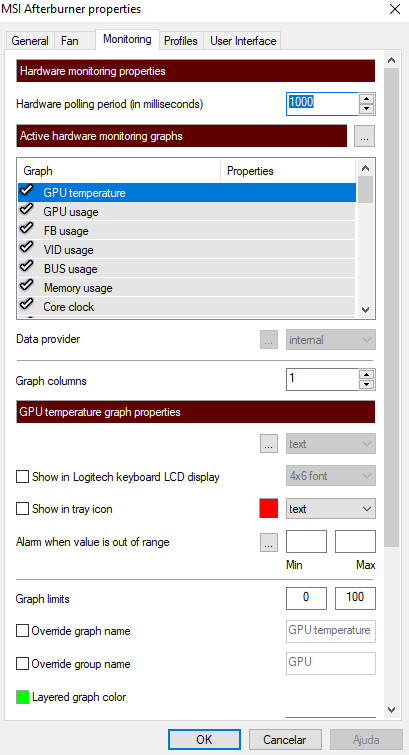
i just downloaded after burner version 4.5.0, it has different options than yours so…i can’t activate it idk why, on the monitoring tab doesnt have that option
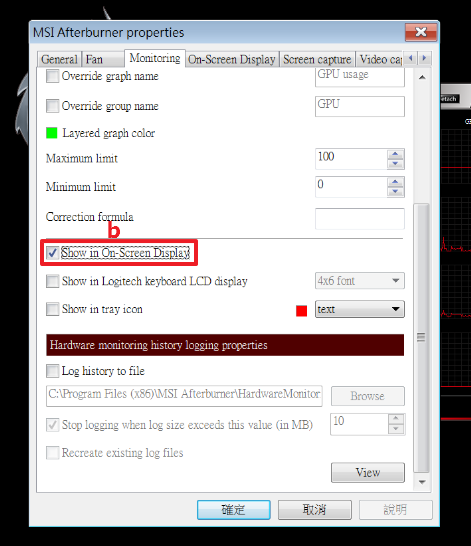
Does it look like this?
Does it also have a ‘Show in on-screen display’ check mark box? Mine does. Unless this box is checked for each stat, they won’t show up in-game in the in screen display.
Looks like this:
Did you allow the installer to install Rivatuner?
Scroll down and put a check mark in the ‘Show in on-screen display’ box. I’m not repeating myself anymore. I’ve said it 3 or 4 times now.
i didnt
it doesnt have it down, i scrolled, maybe it’s because i didnt installed rivatuner?
p.s: does MSI Afterburner does OC by itself???
Yes, you need Rivatuner for on-screen display to work. I’d just un-install MSI Afterburner, reboot the PC, then re-install MSI Afterburner with Rivatuner. Rivatuner comes bundled with MSI Afterburner.
MSI Afterburner doesn’t overclock anything unless you configure it to do so. I just use it to see GPU and CPU usage while playing games.