It did take them forever to fix the DX issue with BF4 if I remember right I couldn’t play that game for more than a month with crossfire enabled or disabled on a pair or HD5850’s, Sat there and played other games and listened to my friends play everyday until 1 day the game had a pretty big patch and I was able to play with the occasional runtime crash.
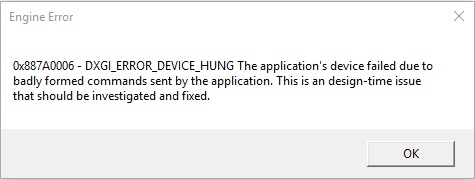
I’ve clocked in 55 hours into the multiplayer so far and have had like 8 or 9 “DirectX” crashes, some that BSOD my system and seemingly semi-corrupt my driver and make me not want to even start the f***ing game again until it’s patched. It is the strangest thing, I have never had a game do this before ever, I’ve had games that crashed but the crashes were repeatable and somewhat consistent and figuring out why was usually easy when going online, or games that were just straight up broken that lagged, stuttered, and crashed within minutes, but having put 55 hours into the game and it running great until out of nowhere BSODs and CTD’s that sometimes happen within 10 minutes of eachother for no obvious reason and then the next day being able to play for 7 hours straight just fine is baffling.
Last I played I got a solid bright red screen right after the game crashed and my PC auto-restarted itself and loaded up really weird with a lower resolution on the splash screen as if I had just installed a new GPU without drivers or something, I’m not letting this broken crap mess with my PC anymore until a new patch comes out or until drivers that specifically mention a fix come out, or if by some miracle someone finds an actual full-proof manual fix.
This is absurd that this many people are having the same issue and it’s like EA / DICE are trying to hide it, they aren’t even acknowledging it officially as far as I am aware.
EA and profanity DICE please let us know what going on with the plan of fixing this game…you guys did brilliant job but not 100% technicaly ready for working in our systems…please let us know what to expect when it will be fixed…
The people who are doing this are playing in map rotations that skip over safe maps and significantly reduce their chances of crashing. If you purposely hunt for the problem maps you can make yourself crash within a couple rounds.
What maps are problem maps? I’ve crashed on nearly all of them I think: Ballroom, forest, Scar, suez, monte, fortress, aimes, etc. I think the desert beta map might be the only one I haven’t crashed on.
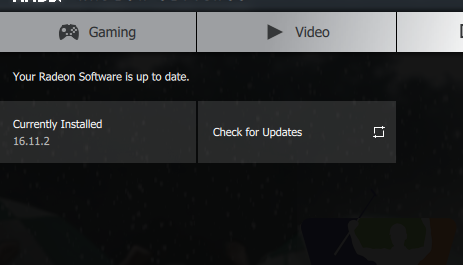
God I hate AMD driver naming system, I have the latest drivers but the number is different, also on 480 8gb, do you have the simpler driver name? Or is it some beta driver and I’m just dumb and didn’t know they were listed looking like that because I can’t find that driver..
I have been experiencing crashes on all maps, couldn’t play for more than 2 minutes without the game crashing with the DX error everyone is talking about. I turned off my SLI, (I have 2x 580s) and game is now working…Played for over 2 hours and no issues so far (knock on wood). For those with SLI and having problems, you might want to give it try. Good Luck!
What about Titanfall 2? The same error (DXGI_ERROR_DEVICE_HUNG) and it’s using Source Engine, not Frostbite :))) @RedRiveRR_ @jakethesnake4000@Timbo196
Even @Sledge70, community manager there, wrote ‘This error is specific to Driect X drivers.’
Last time i played it for about 3-4 hours..ending with a crash resulting in a complete shut down of my win7 pc. Normally it shows that anyoing directX error, but sometimes the whole pc is rebooting or just shuts off. Which reminds me to check the temperature of the gpu and cpu (also set my fan on high speed manually & set a lower gpu clock) but everything seems fine. also, no problems with other actual games.
sad.
There is also a huge thread on the nvidia forum about this…anyway, we only can wait until they tested it. And it could take even more time if it is not just a nvidia problem..
Been loitering a lot in the forums and was trying to find the solution for this problem. Yes it happens to me evrytime on Monte grappa, Empires edge, St Quentin Scar and Ballroom Blitz… I noticed something tho. Out of all 9 maps we have here, those 4 ones that crash everytime have the biggest/widest draw distance. Can that be an indicator? IDK but just wanted to throw that in here. When u come from F to E in St Quentin u can see the whole map, when being in the castle in Ballroom u can see all B,A and D,E from it with a massive draw distance. On Grappa u can see all the map from B and on Empires edge, well thats the biggest map we have atm. on C and D u can see all the map again. Correct me if im wrong but i highly think that this must be a clue or something. Have a nice Weekend
This is litteraly the last game I buy form EA. Still no words coming from my support ticket. Great support. Can’t even ask for a refund. 2016 and this kind of thing can still happen ? No way… I’m sick of all this.