DISCLAIMER
I have not been active on this thread anymore, since this issue resolved itself after getting my new hardware. I actually have not played BF1 for a few months, since its incredibly boring cause of its casual gameplay. Literally one of the easiest game out there. I am STUNNED that they dont give a … .
So I might be here once a while, trying to keep the thread on track, but I highly doubt that will help.
Anyways, wish you the best guys. I hope one day EA cares about customers.
Latest Update: Page 282
Page 283
Updates:
Potential workaround that has been working for SOME people. Note that there have been reports of problems with their OS or detection of your GPU. It might crash your system as well, so use at at your own risk. !Seems not to be compatible with Win10!
- turn off any automatic driver updates in Windows 10 or whatever OS you are using
- Use DDU to delete everything from your drivers (http://www.wagnardmobile.com/forums/viewtopic.php?f=5&t=673)
- Install driver version 334.89 which can be found here: http://www.nvidia.com/download/driverResults.aspx/73218/en-us
- Since Battlefield 1 will complain about old drivers do the nvapi64.dll bypass (https://forums.geforce.com/default/topic/962633/pc-games/bypassing-the-driver-version-check-of-a-game-/)
Have been getting this error about every 20 Minutes.
DirectX Function “GetDeviceRemovedReason” failed with DXGI_ERROR_DEVICE_HUNG. GPU: “Nvidia GeForce GTX 690”, Driver:
37306
I’ve literally spent more then an hour trying to find a fix without any result. As usual, i do not get any response from the EA support, which is quite annoying.
I have used the later driver, which did not help.
I have used the previous driver, which did not help.
I have tried re-installing the game and repairing the game, which did not help.
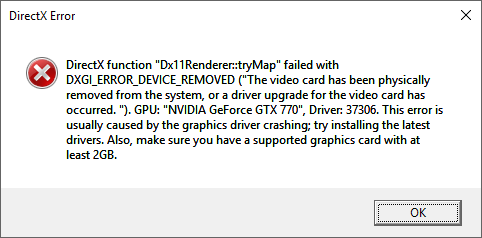
All suggested Fixes that did not work for this specific error (Thanks to Kirister for keeping this list up to date) :GPU (GTX 770)
- Underclocked Core (-105MHz, which is the max value) / Mem (-685MHz).
- Set maximum safe values for Overvolt, Power and Temperature target.
- GPU temperature goes up to 75°c in 100% load, which is within the normal range.
- Removed GPU physically and cleaned the dust off.
- Stress tested GPU using Furmark: no issue.
- Set display to 60Hz (from 144Hz).
- No crash in any other game than BF1, including BF4.
GPU Drivers (nVIDIA)
- Tested drivers 368.81, 372.70 (nvapi64.dll bypass), 372.90, 373.03, 375.57, 375.64, 375.70.
- Uninstalled Geforce Experience (which includes Shadowplay).
- nVIDIA control panel: Power management mode – prefer maximum performance
- nVIDIA control panel: Threaded optimization – off
- nVIDIA control panel: Triple buffering – off
- nVIDIA control panel: Vertical sync – off
- nVIDIA control panel: Maximum pre rendered frames – 3 (and 1, 2)
- nVIDIA control panel: PhysX to CPU
- Disabled all nVIDIA services.
- Minimal nVIDIA drivers install (without physx, hd audio, geforce experience and 3d vision).
RAM
- Memtest came clean.
- Disabled XMP Profile in Bios (resulting in lower frequencies).
- Changed RAM (from 2x4Gb to faster 2x8Gb sticks).
Motherboard
- Updated Bios.
- Checked and updated all drivers (chipset, hdd, Realtek HD Audio…).
- Reset Bios settings to default.
- Disabled Intel SpeedStep/EIST in BIOS.
Origin
- Disabled Origin in-game overlay.
- Disabled all notifications.
Windows
- Running Windows 10 64bits up-to-date.
- Very clean Windows 10 install with minimal programs running in the background.
- Applied Regedit fix to increase TDR delay.
- Turned off DVR in Windows 10’s XBox App.
- Reinstalled VC Redist.
- Changed Language for non-Unicode programs To English(US) (from French (FR)).
- Power options > PCI Express > Link state power management OFF.
- Installed DirectX 9.0c End-User Runtime.
- Created new user session.
- No overlay or GPU tool running in the background.
- Disabled Aero Peek.
- Reinstalled Windows 10 ( @-OI1VI3R- ).
Battlefield 1
- Deleted settings (BF1 Folder in Documents).
- Repaired BF1.
- Deleted, re-downloaded and reinstalled BF1 completely.
- Switched from DX12 to DX11.
- Switched from Fullscreen to Borderless.
- Ran the game as admin.
- Tested lowest settings.
- Toggled GPU Memory Restriction ON/OFF.
- User.cfg: Gametime.MaxVariableFps 60 (and 61~80…)
- User.cfg: RenderDevice.Dx11Dot1Enable 1 and RenderDevice.Dx11Dot1RuntimeEnable 1
- User.cfg: RenderDevice.RenderAheadLimit 2 (and 1, and 3)
- Motion Blur and Weapon DOF turned OFF.
- Tested with no ALT-TAB out of the game and fresh Windows session.
- Sacrified a goat.
Its not only Nvidia, but AMD aswell.
Confirmed very recently by nVIDIA themselves:
My PC isnt the best one out there, but i should be able to run BF1 at atleast medium as im consistently getting 100+ FPS.
Some Specs i found out (Not really a tech guy):
Windows 10
x64 Operating system
Nvidia GeFroce GTX 690
Intel(R) Core™ i7-3820 CPU @ 3.60GHz
16 GB RAM
*Note: The Beta worked just fine, except some lagspikes. And none of my gear is overheating.
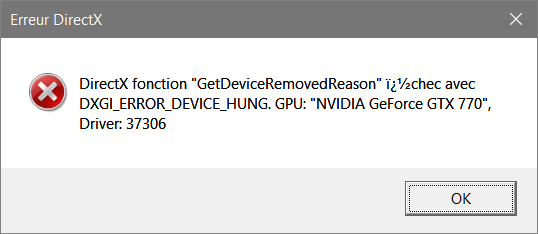
 gtx 770 here … so annyoing everyone else is playing from my friends but i cant.