Latest message from nVIDIA (posted <1hour ago).
If this bug was in BF3/BF4/HL then hopefully the enormous popularity of BF1 (being called the best BF game of the decade according to many) is acting as a catalyst to actually solve this.
Meanwhile I can only play my safe 3 (don’t know the actual names) to avoid crashing
- Forest
- Amiens
- Desert Castle
If it’s any others all my friends and I back out and I find us all a new one that is one of these. Otherwise ill get the full lock up and wince as I hold down my power button.
Alabatross:
GrateFuIlDead:@Braddock512
Although I think this is a Nvidia problem, thanks for giving this attention and showing support in efforts to find a simple fix.
I been reporting on Nvidia’s driver bug forums for release 375.63 , and so far no response from them at all .
Rolling back the drivers is one thing I have not tried because BF1 prompts you to update driver in order to continue .
I wanted to use the driver I used for the beta but dont know a work around to that message that pops up when you start BF1.Nvidia already said they can reproduce the crash on non-Nvidia cards, ball is in DICE’s court.
The ball has been in Dice’s court ever since the emergence of the Frostbite 2.0 Engine. These issues have been plaguing every Battlefield game that has used it. Instead of looking at their own code they like to point fingers and blame everyone else. They’ll never own up to it until people file a class action lawsuit against them for selling a faulty product.
I’ve literally tried everything that has ever been suggested to fix this issue for any Frostbite Engine game. The only game that doesn’t have remotely the issues has been Battlefield 4 ever since the “third string” or “life support” team took over patching, which was after all the DLC was released and they shifted everyone over to Battlefield 1 development. Says a lot that those guys are actually capable of fixing issues, says a lot about the incompetence of the initial dev teams.
At first my crashes were every hour or two, maybe 3. Now I can’t play a single round without crashing, sometimes locking things up so bad I have to hard shutdown. This is literally the only game engine that does this crap too. I have a Steam library of around 200+ games, not a single one has stability issues that I’ve seen. Only my Battlefield collection since Battlefield 3 (Frostbite “2.0”, more like “.0”) has had these issues with the Device Error. This error has been across multiple GPUs, CPUs, motherboards, RAM, HDDs, SSDs, and OSs.
Every single time they try to pass the buck to Nvidia/AMD, or other driver manufacturers and deny all responsibility. Then, once that “third string” gets involved, they magically start to disappear. I think a lot of it is developer pride and arrogance. They refuse to look into their own product. We won’t get a fix for this for another year or two, and then it’ll just silently stop happening.
Uh ? every Frostbite Engine Game?
For me i Played BF Bad Company 2 ; BF 3 ; BF 4 ; Star Wars Battlefront; and i never ever had in this Frostbite Games this Dirext X error. So it is at least for me a BF 1 specific Problem.
God Thanks im Going to vavation for a Week . Hopefully they fix somthing.
MFG
Hi, I played four hours and again appears Dx problem
](http://postimg.org/image/5rzwg3mdn/)subirimagenes
I made this and the problem continue:
- Disable Dx12
- Disable origin overlay
- repair the redists
PC config:
Windows 7 64 Bits
Driver: Nvidia 375.63
Intel Core i7 2600k Stock
DDR3 8GB G.Skill Ripjaws 1600
Nvidia GTX 670 V.Ram 2GB Stock
Motherboard: ASRock Fatal1ty P67 Professional
Creative Sound Blaster Audigy 2 ZS
Psu: Cooler Master 850w
Hello,
The Dev team continues to investigate and work on this issue. Definitely understand how frustrating this is.
One of our QA guys had the same issue with his GTX770 and tracked it down to an outdated Realtek Audio driver. He updated the driver and swapped Windows Power Settings from Balanced to High Performance and hasn’t experienced a crash since.Those experiencing this issue, give that a try.
I’ve also just drafted an email to the studio team to find the status of their investigation, any possible workarounds, and potential fix date.
Will keep you posted.-Braddock512-
Already had high power mode and updated driver…
cmon I cant even finish a single round
Neo_Bahamut_19:
Alabatross:
GrateFuIlDead:@Braddock512
Although I think this is a Nvidia problem, thanks for giving this attention and showing support in efforts to find a simple fix.
I been reporting on Nvidia’s driver bug forums for release 375.63 , and so far no response from them at all .
Rolling back the drivers is one thing I have not tried because BF1 prompts you to update driver in order to continue .
I wanted to use the driver I used for the beta but dont know a work around to that message that pops up when you start BF1.Nvidia already said they can reproduce the crash on non-Nvidia cards, ball is in DICE’s court.
The ball has been in Dice’s court ever since the emergence of the Frostbite 2.0 Engine. These issues have been plaguing every Battlefield game that has used it. Instead of looking at their own code they like to point fingers and blame everyone else. They’ll never own up to it until people file a class action lawsuit against them for selling a faulty product.
I’ve literally tried everything that has ever been suggested to fix this issue for any Frostbite Engine game. The only game that doesn’t have remotely the issues has been Battlefield 4 ever since the “third string” or “life support” team took over patching, which was after all the DLC was released and they shifted everyone over to Battlefield 1 development. Says a lot that those guys are actually capable of fixing issues, says a lot about the incompetence of the initial dev teams.
At first my crashes were every hour or two, maybe 3. Now I can’t play a single round without crashing, sometimes locking things up so bad I have to hard shutdown. This is literally the only game engine that does this crap too. I have a Steam library of around 200+ games, not a single one has stability issues that I’ve seen. Only my Battlefield collection since Battlefield 3 (Frostbite “2.0”, more like “.0”) has had these issues with the Device Error. This error has been across multiple GPUs, CPUs, motherboards, RAM, HDDs, SSDs, and OSs.
Every single time they try to pass the buck to Nvidia/AMD, or other driver manufacturers and deny all responsibility. Then, once that “third string” gets involved, they magically start to disappear. I think a lot of it is developer pride and arrogance. They refuse to look into their own product. We won’t get a fix for this for another year or two, and then it’ll just silently stop happening.
Uh ? every Frostbite Engine Game?
For me i Played BF Bad Company 2 ; BF 3 ; BF 4 ; Star Wars Battlefront; and i never ever had in this Frostbite Games this Dirext X error. So it is at least for me a BF 1 specific Problem.
God Thanks im Going to vavation for a Week . Hopefully they fix somthing.MFG
Why don’t you look through the forums for the other games for similar issues, hrm? Ye ol’ “didn’t happen to me so it doesn’t exist” logic you haz.
I even plainly stated that I’ve had those issues, “across multiple GPUs, CPUs, motherboards, RAM, HDDs, SSDs, and OSs” and that “Only my Battlefield collection since Battlefield 3” and that “The ball has been in Dice’s court ever since the emergence of the Frostbite 2.0 Engine”
This issue started cropping up AFTER Bad Company 2, that was still on the Frostbite 1.0 Engine. BF3 was the first on the FB 2.0 E.
Just a few threads:
Battlefield 3: battlelog.battlefield.com/bf3/en/forum/threadview/2955065210854961836/
Battlefield 4: device hung?
Hardline: https://talk.turtlerockstudios.com/t/tell-us-the-status-of-dxgi-device-hung-error/50487
MoH Warfighter: Forums - Battlelog / MOHW
Took me a minute to find just 4 examples of other Frostbite 2.0 Engine games that have the Device Hung issue.
Can someone test this?
Because after i have set up as i did, this config seems that works fine for me.
My Rig
CPU i5 4690k
GPU gpu 770 (drv 375.63)
RAM 8gb
SND Creative SB-z
Temp in game
CPU
Around 60°
GPU°
min 55°(all time is stable on it)
max 68° (but idont see when i got this point)
°Celsius scale
In game the options are (with V-SYNC ON i tested also OFF)
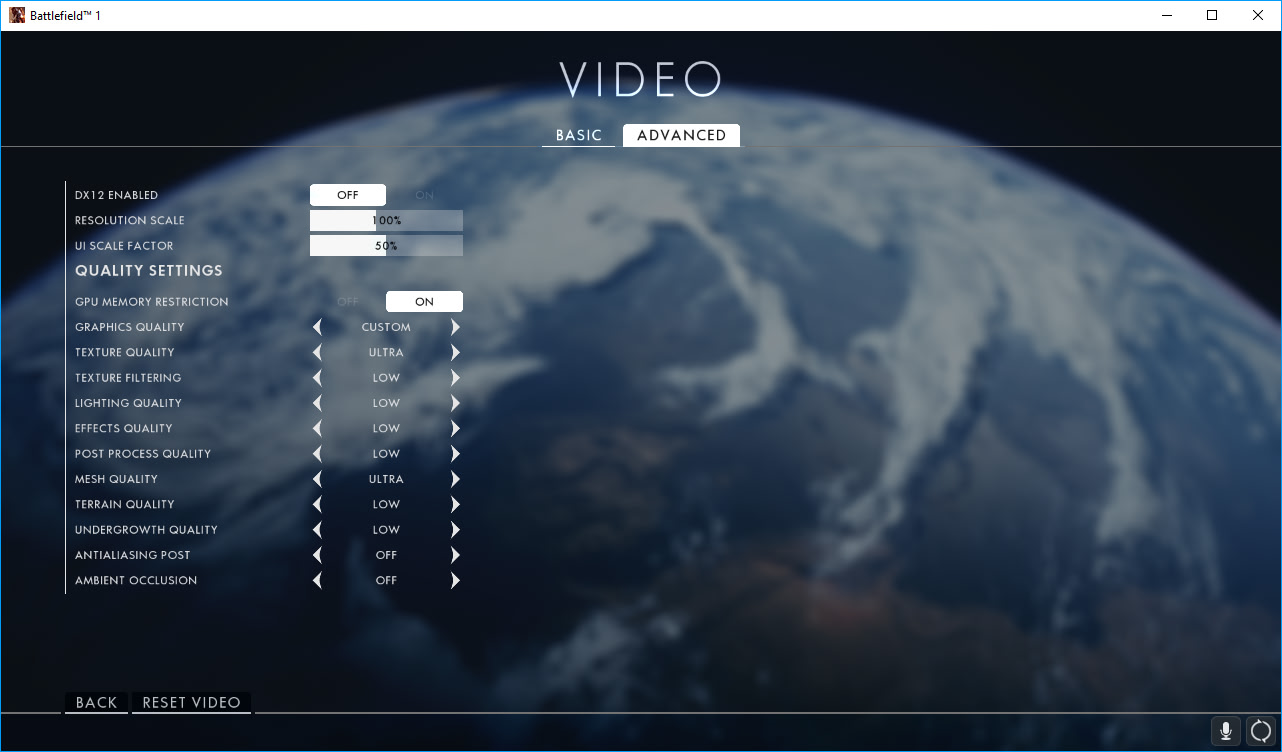
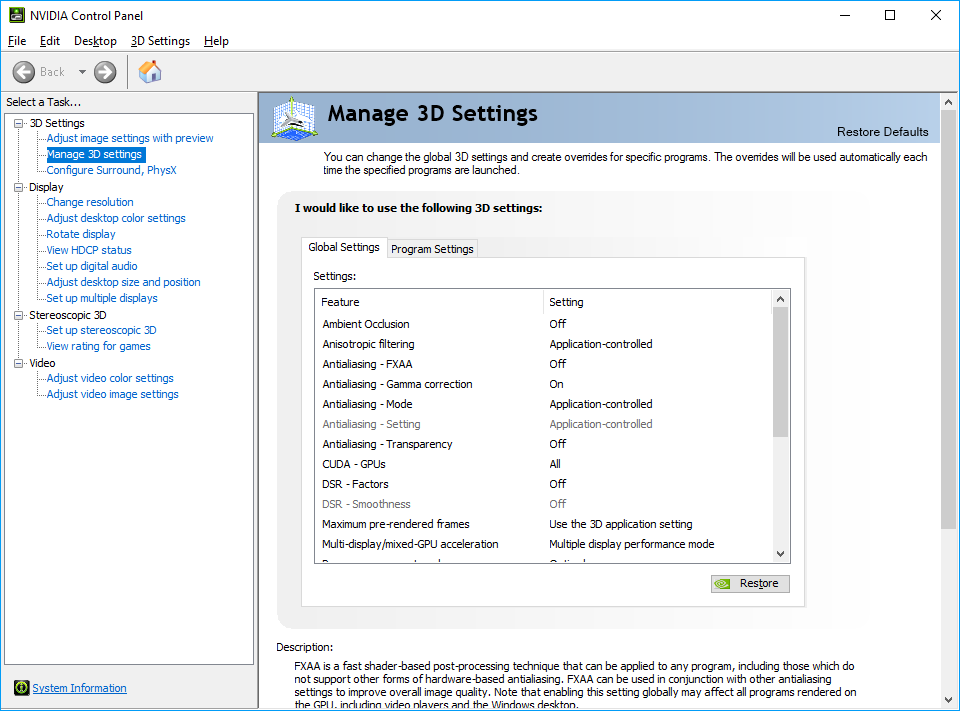
as Global 3D settings in Control Panel i have this
part I
part II
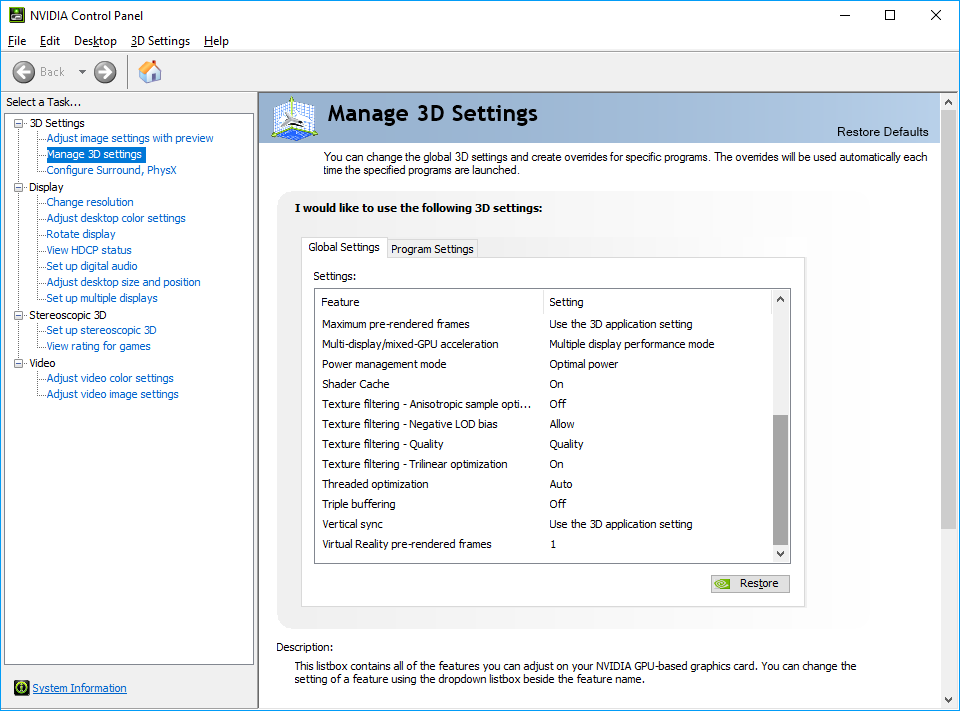
Game runs smooth and stable, but maybe is just a singularity
Tell me your feedback.
I make some hard test this long week… see you in game.
I repeat - need to work on it: KernelBase.dll 6.1.7601.18015 (Win7 x64) This is a problem inside the code of the game, on video cards with factory overclocked frequencies (Boost). Game crushes driver. And nothing will not help, except for correction of this library “KernelBase.dll”
did you try this method?
Can someone test this?
Game runs smooth and stable, but maybe is just a singularity
Tell me your feedback.
I make some hard test this long week… see you in game.
That’s exactly how my settings are but I’m running a GTX690, so it has multi-GPU rendering. Obviously processor, memory, and so on are different. Running Windows 10 as well.
Still crashing.
The fact that solutions are so inconsistent really leads me to believe it’s not an issue with things external to the game, but to believe it’s something wrong internally with the game, specifically the engine since this has been going on through multitudes of games using this engine.


