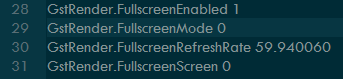
So after having this issue myself and speaking with EA over the phone, it seems like this is such a new issue it’s hard for people to diagnose, thanks to reddit user Rukudo, he posted this fix which seems to work for me. I’ve pasted his response below, it seems like an issue in Borderless mode, I’m assuming EA will release an update shortly to address this issue.
For nubs, here’s a step by step guide:
Go to this location C:\Documents\Battlefield 4\settings or wherever your primarydocuments folder is.
Open “PROFSAVE_profile” with Wordpad / Notepad++
Lines 28, 29 & 31 must be set to the same options as the quoted post above, this is what it should look like
Done! The game should run as expected now, if you’re still running into issues, check the Realtek Audio Driver as this is something that could also influence the issue.
Thanks a lot for this ! That’s what I tried too and I wasn’t aware of the existence of your post.
If I can add something, think about closing programs like Razer Synapse and his brothers, that’s what I did too and BF4 is now working perfectly. The solution works for BFH too by the way.
I think it’s been almost 2-3 months since Microsoft broke this, coincided with a Game DVR update. Disabling gamedvr doesn’t solve it
Hopefully either parties can work out a fix
Still don’t understand how this passed QA, as Microsoft explicitly asked for battlefield 4 feedback
Thank you so much! Seriously thank you thank you thank you!
Spent 5 hours troubleshooting and freaking out over this, knew it was the new windows update that was causing this problem.
Went through numerous forum posts and finally found this one, looked at the date and my god… August 2nd.
It worked flawlessly, took me 5 minutes and it fixed it for me!
It’s not work for me
When I open the PROFSAVE_profile, the number after lines 28,29 & 31 are already 1,0,0.
Then I launch bf4, it crash and make a loud noise, I can’t even back to desktop!
What should I do next? Should I wait for update?
Hey one more thing all of the code you said in this thread is 1 line above what mine is. Instead of 28 - 31 it’s 29 - 32. Could this cause cause problems?
Potentially, you’re looking to copy the options I have, if your GstRender.FullscreenEnabled 1 is line 25 instead of 28, that’s fine, just copy the end number, that being 1, only reason I mention the line numbers is to help people find the options more quickly and because this is the default config.