[FIX] PerfOverlay.DrawFps 1 stay on screen [FIX]

Go to origin
Right Click on Battlefield 1 and choose “Game Properties”
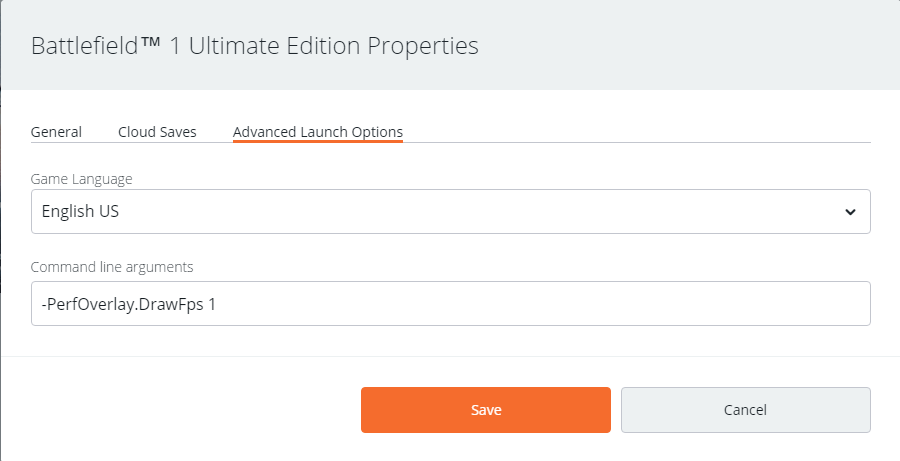
Click on “Advanced Launch Options”
In field that say’s “Command line arguments” write this:

-PerfOverlay.DrawFps 1

After that click on “Save”
Do not forget a dash symbol at the beginning of the command -
Here’s my screenshot of how it should look like

My FPS is showed all the time while i’m in game, loading screens, menus,etc.
let me know if this worked for you aswell.

Size and positioning commands:

-PerfOverlay.FpsDisplayScale 3 (1,2,3. Choose your style. )
-PerfOverlay.FpsDisplayOffsetX 025  ( Move it left or right. Experiment with it )
-PerfOverlay.FpsDisplayOffsetY 025  ( Move it up or down. Experiment with it )
Thank you, it works :slight_smile:

Worked for me also. Nice!

Nice, thanks a lot, i had the same problem

thanks you

Thanks! This is great!

Can we be friends? I need a friend like you.

Thanks. I will try set up my “user.cfg” this way. :slight_smile:

Nice find Holmes! TY

Don’t think that will work. If you played Counter-Strike.. this is similar to it.

Sure, why not :slight_smile:
I’m glad it helped you guys.

It won’t work that way, already tried.

TY TY TY

Thumbs up!!!

Thanks thumbs up

Thanks !

It actually works, thanks.

Thanks! BTW, Dice is looking for help. :wink:

YES! Dice, we no need you patach AHAHAHHA

Well done, great find m8, Does anyone know how to make the fps counter bigger as it looks tiny on my screen, thanks