System specs:
monitor: Asus PG348Q
CPU: Ryzen 5 1600 @3.8
MOBO: Gigabyte x370 K5
VGA: Asus strix 1080ti (newest driver)
RAM: Corsair Vengeance 16 Gb 3000 mhz (single modul)
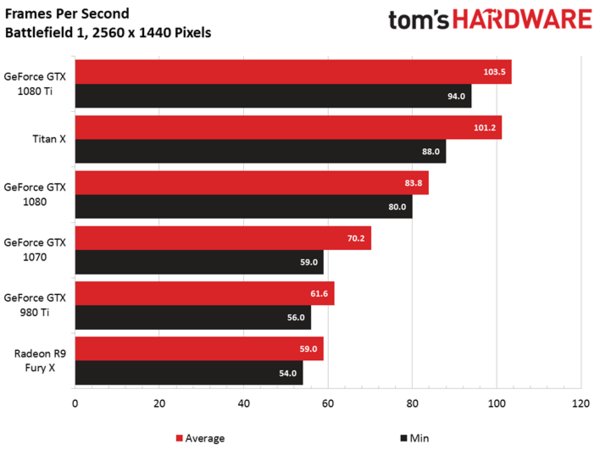
So what I’m basically getting with this config in ultra at 3440x1440 is around 60-80 fps in multiplayer, which seems like around half of what I should get. Its a fresh Windows 10 install, tried reinstalling drivers with DDU, resolution scaling is not the issue either. In game the CPU usage is around 60% on 6 threads, and 90+% GPU at proper clock speeds. I’m out of ideas, please help.
I think that’s about right given the low clock speed per core that you have and the resolution.I have 4930k and 1080ti gigabye xtreme edition, im runnig the game most all settings on ULTRA and i have dips to 90fps to 180fps at 1080p.You really need a good CPU for BF1 so yeah.
Ultra adds very few visual upgrades you can see that by comparing presets and you will see there are barely any differences but performance hit is high. I recommend medium-high with 200 % render resolution. That will result in much sharper and detailed image = much better graphics than ultra trap.
BTW post procssing alone on ultra eats up a ton of frames.
Put everything to low and it will be at 200 FPS most of the time. This will reduce input lag. Turn off Gsync as well, if you have it, it will also reduce lag. I go for the fastest response time in MP shooters. After all, the whole point is to win.
But people don’t exactly buy 1080ti to play on ghetto settings and peasant “tricks” to preserve fps. That’s exactly why I’m still on my 1080p monitor and gtx1080.
Post process effects change scene fidelity big time.
My 1080 performace spikes and stuttering has been fixed as of last night! Just install May 25, 2017—KB4020102 (OS Build 15063.332) and I am use the 382.19 drivers and all the major spikes and stutter I had after the Creators Update is gone!! Updates had to be manually checked to receive this and a restart was required. Upon looking at the files that were listed at changed or updated here at MS supoort: https://support.microsoft.com/en-us/help/4020102/windows-10-update-kb4020102 at the bottom under file information is a link to the MS spreadsheet, give it a try.