it helped me so im helping you 
yep i got 4 slots and each slot has 16gb ddr4 3000hz in them, on a Z170-AR Motherboard
That depends. If you have a high end cpu and 16gb or more ram, the difference is negligible. If you have 8gb ddr3 in single channel, with an i3, or fx cpu, then you need to be.
Well Im no agree… I move from 2x8gb 1866 ddr3 RAM to 2x8gb 2400 ddr3 Ram with a 4790k @4700 and difference in performance is SO NOTICIABLE!!! I get solid FPS and SMOOTH image… There was a bench comparing how BF1 is very RAM SPEED dependient…
For me makes a big change!!
Cheers
what , this is common knowledge your ram runs twice as fast , if your ram is in single channel it will run at like 900mhz not 1600 ect download cPu z and look at your ram
Yes because dual channel makes your PC SOOOOOOO much faster at gaming even Sonic the hedgehog crams two ram sticks in him instead of just one
Mate they are talking about 2 sticks instead of 1 not Dual rate memory you are speaking of >_>
You don’t know what you’re talking about. don’t spread false info.
Dual channel does not increase memory timings.
it helps some in some situations. For battlefield and frostbite engine it can have a noticeable effect I agree
With duel channel, your memory sticks fight with each other and it’s much slower. Dual channel allows both the sticks to be accessed at the same time, giving a few percentage points increase at best.
I3 6100 single 8gb 2400mhz stick in my sons rig no issues.
Not saying it don’t help but he has no issues either.
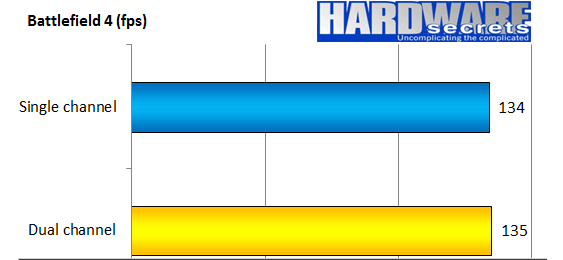
You are absolutely right it does have a difference! With 1 more frame in a second I can surely react faster with the l33t pr0 skill to snapshot someone
can I have a duel too please. I suggest knifes at 10 paces
Dual Channel only makes things better, it will not give you a Faster timings.
http://www.hardwarereview.net/Reviews/ASUS P4SDX Deluxe/ASUSP4DXDeluxe.htm
is there any pros for quad channel ??
Not actually. Quad Channel normally causes a higher memory controller load, which increases the latency significantly and sometimes also require more voltage to compensate the more power draw. Additionally, memory overclocking with 4 sticks is more difficult and could cause instability with the same memory settings.
Best choice is :
- Get higher frequency ram -3000, 3200Mhz, etc.
- Set more aggressive memory timings , change 2T to 1T or enable any XMP profile if supported. Add some voltage if there is any instability and test your memory.
- Get two identical sticks so you can easily enable dual channel mode.
If you are tweaking memory settings to get a gaming boost, you are probably looking in the wrong place for real performance. Plenty of other areas of a PC that offer a more significant instant gaming boost i.e. moving from spinnng disk to SSD. Overclocking memory is just a ticking time bomb that will give you the most annoying faults to identify.
This is a useful article -
http://www.gamersnexus.net/game-bench/2677-bf1-ram-benchmark-frequency-8gb-enough/page-2
I went from dual to quad channel recently when i added another two sticks of ram and it did exactly the same as it would if id gone from single to dual…NOTHING!!
In the fields of digital electronics and computer hardware, multi-channel memory architecture is a technology that increases the data transfer rate between the DRAM memory and the memory controller by adding more channels of communication between them. Theoretically this multiplies the data rate by exactly the number of channels present. Dual-channel memory employs two channels. The technique goes back as far as the 1960s having been used in IBM System/360 Model 91 and in CDC 6600.