When Setting up my controls in the key binder , I see that I can not assign my joystick (logitech attack 3 ) . The joystick options are preset but can not be changed .
Anyone else with this issue ?
Same here. Extreme 3D Pro. Stick does not work in game, and looks like it isn’t detected by game.
If you change plane controls to custom under control schemes you can then change things in key bindings menu screen. HOWEVER, THE GAME WILL STILL NOT RECOGNIZE ANY JOYSTICK INPUT. ONLY GAMEPADS.
Battlefront did something similar - there was rudimentary joystick support only and they NEVER brought in full joystick support/keybinding.
Same, a joystick would be a godsend for flying and a gamepad would be nice for driving. Settings there for both, neither work at all.
They are just getting lazy.
They need to fix this. Obviously support was intended, as illustrated in the keybindings menu for joysticks.
No joystick is a deal breaker.
Same here, real bad all grayed out. Have a 568 Combatstick USB
Let’s be honest here:
They had perfectly fine DirectInput (=oldschool joystick) support in ALL previous Battlefield games including BF4 and then PURPOSEFULLY took it out for BF1 for XInput only.
Which is what I see in a lot of new releases recently - maybe Microsoft is pressuring developers to do it this way?
Anyway, it’s downright disgusting because they SHOULD know the Battlefield franchise has lot’s of oldschool players that want to use their legacy joysticks and have done so since BF1942. There’s really no excuse to ¯_(ツ)_/¯ of those players by making the game XInput only, esp. since you could just copy-paste DirectInput code from previous Battlefield games.
Fortunately there are ways to emulate XInput through software like X360CE. It’s somewhat complicated, but I don’t think DICE will backpedal to DirectInput support (otherwise they wouldn’t have ditched it in the first place) so this will probably be our only option.
I’ll try to hook up X360CE to BF1 and post results + tutorial in this thread.
If they do not add standard joystick support, I am cancelling my pre-order and boycotting Battlefield permanently - a series I have played since BF1942. The reason 1942 was so good was the realistic physics and awesome feel of flying old-fashioned planes with a joystick. It’s also the reason my hopes were so high for this game.
Joystick support was added to the game with the 15. nov patch so you shoudn’t nead this anymore.
I got it working! Here’s how you do it:
- Make sure to disconnect any other controllers/joysticks and only leave the one you want to use plugged in (unless you know what you’re doing
 )
- Download the newest 64-bitversion from http://www.x360ce.com/ and download or move the .zip file to your BF1 folder.
- Extract the .zip archive so x360ce_x64.exe is in the same folder as bf1.exe
- Launch x360ce_x64.exe. First it wants to create xinput1_3.dll. Confirm that.
- Then it wants to find a layout for your controller. You can try and find one from the internet, but esp. with joysticks it’s best to choose the clear layout and assign it manually.
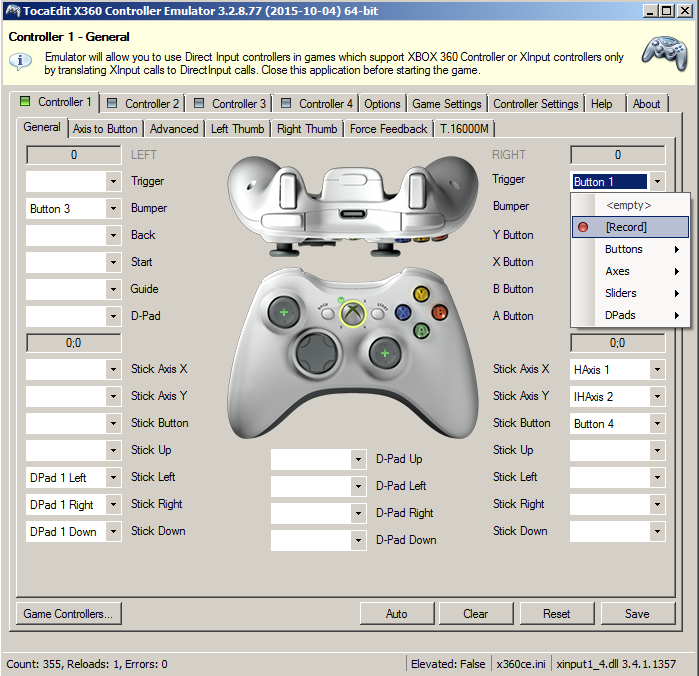
- At this point you should see the [General] Controller tab. Assign buttons/axes with the easy to use Record function:
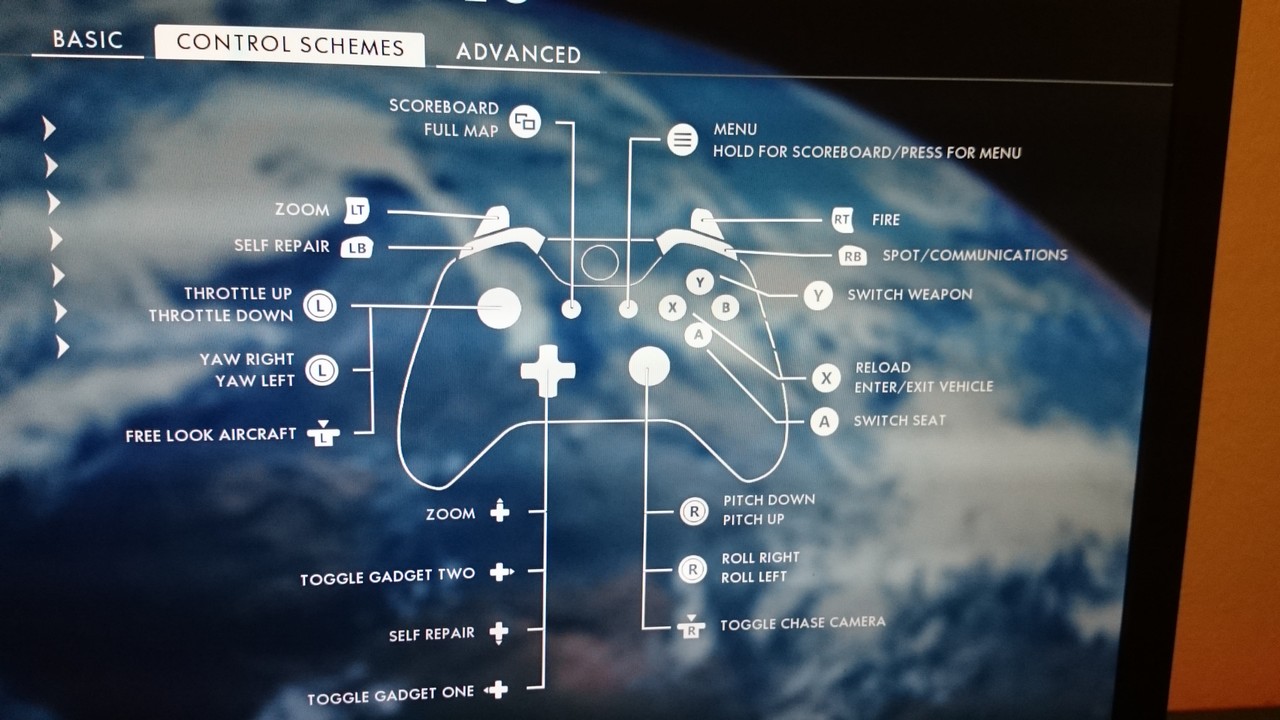
- Maybe you have to invert some axes, but you’ll figure it out - here’s the BF1 joystick layout for reference:
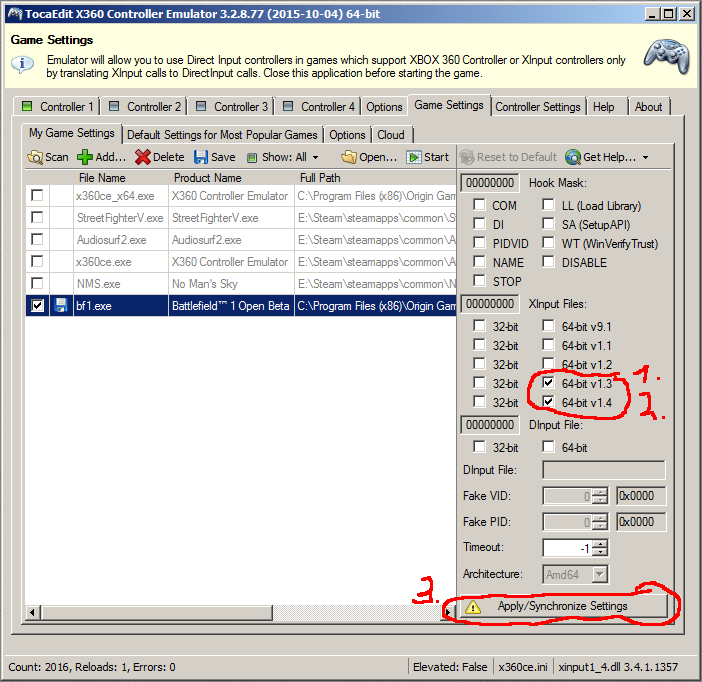
- Now we have to switch to the [Game] Settings. Select BF1 and then select 64-bit 1.3 and 64-bit 1.4 like this:
- “Apply/Synchronize Settings” and you’ll have two dlls in your BF1 folder: xinput1_4.dll and xinput1_3.dll
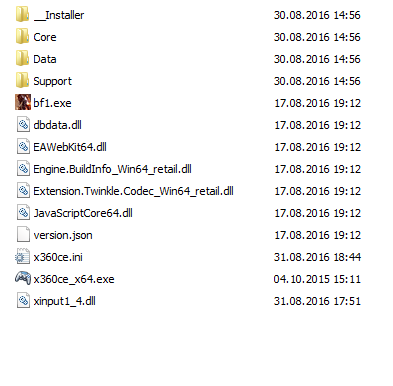
- Delete xinput1_3.dll so your BF folder looks like this:
Now, in theory, you’re good to go. You can close TocaEdit now because only the .dll will hook up with BF1 (a bit like a cheat, but not really [you’re absolutely save to use this]). You can always launch “x360ce_x64.exe” again to change your layout settings. Its enough to save those further changes by clicking “Save” in the [General] tab. You don’t have to “synchronize” the dlls for that again (the layout is saved in “x360ce.ini”).
Well… this is unnecessarily complicated, but I tried following all your steps and will give it a test once the servers aren’t down and games are not failing to load 
BTW the I found out how to customize your joystick/gamepad controls in the game so it’s not greyed out anymore:
- In Battlefiled 1: Go to Options → Controls → Control Schemes
- On the left side, where you have “Air Vehicle Buttons” etc.: Select “Custom” for each row instead of "Default".
- Now you can edit the Joystick controls in Options → Key Bindings.
You still need an XInput compatible controller (or emulate one like shown above) though.
Yes, another one of too many straight away disappointments to me. As a fan of BF series i dont feel taken care of properly.
Is there an option in there to change thumb sticks do? Currently the left one adjusts the speed, and the right one adjusts pitch. Being left handed, i would like to switch the thumb pads around..?
EDIT: Found it!! All i had to do was change my controller from XBOX to PS4..woot
Thank you very much TheShinken, I got that working and my god is flying far more enjoyable and easy now.
They really better put directinput back in for full game release otherwise I imagine a lot of older players are going to be crying foul, especially as its been in EVERY GAME up to this except Battlefront (which caused me much rage). Really comes off as a direct snub to those players, almost saying “nope, we don’t want or need your money”.
And of course it couldn’t be that simple. for some god forsaken reason, cavalry maps to the same keys as aircraft, so my joytstick inputs are over riding my mouse when I jump on a horse. FFS DIce, this is just ridiculous.
can someone help me out with this, using 2d pro..and its hard to figure out..tia
Thanks for the tip, TheShinken! Flying in the BF1 beta now with my Logitech Extreme 3D Pro. I used the profile it found on the internet when I plugged my joystick in with X360CE running. Then went to the general tab and clicked auto. Didn’t have to use the record button to map anything. Then just followed the rest of your steps and set up all my bindings under joystick for flight in the game. Works great. I was actually starting to get pretty decent flying with the kb & mouse, but I’m used to a stick and find the flying more enjoyable that way.
I also got it working, and could actually fly competently with my 3D Pro. I am still trying to memorize which keys I bound to which commands, but the basic maneuverability was the biggest thing.
I still will not rest until they implement direct input though, because as others mentioned, the joystick seems to override other controls as well, and unless I put my throttle slider in the middle, my character will automatically move forward. I also like having a specific “Bomb” button (side thumb button on the 3D Pro) and the trigger for my guns, but with this configuration you have to cycle weapons and use the trigger for every type of weapon.