Since august when they’ve added all the bloody patches this game is getting worse and worse… After the “in the name of lag” update the game is absolutely unplayable. Low fps, stutters, 100% cpu usage. I enjoyed 60fps on this game for 2 months then they started to upgrade this useless game. I’ve tried everything even lowering the graphics and still nothing. So please don’t come here to tell me “ahaha you nooob, buy gtx 1080” because i won’t. I don’t have money on my plates like you so shut up about that. I have an i5 7400, gtx 950, 8gb ddr4 and a 1440x900 monitor and this game ran without any trouble on ultra. Now, it’s horrible to play it
Same on fx8350. team deathmatch 12x12 today loads it on 100 and my patience is over
When CPU is at 100% playing BF1 go straight into task manager and see what is using the CPU. There maybe something running in the background you can turn off. Also limit FPS to 60 which will help a little.
The problem is you are below the recommended minimum specs and tweaking will help but you will likely still get FPS drops when there is a lot of action on the screen.
Same here on core i5 4670K @ 4.4 ghz, never had stutter aka major frame drops, now I get it on a regular base.
My gpu is only running at 60%.
I think your videocard with thermal paste got dried up and your cpu also.
Mine is fine today after cleaned my pc and replacing the thermal paste.
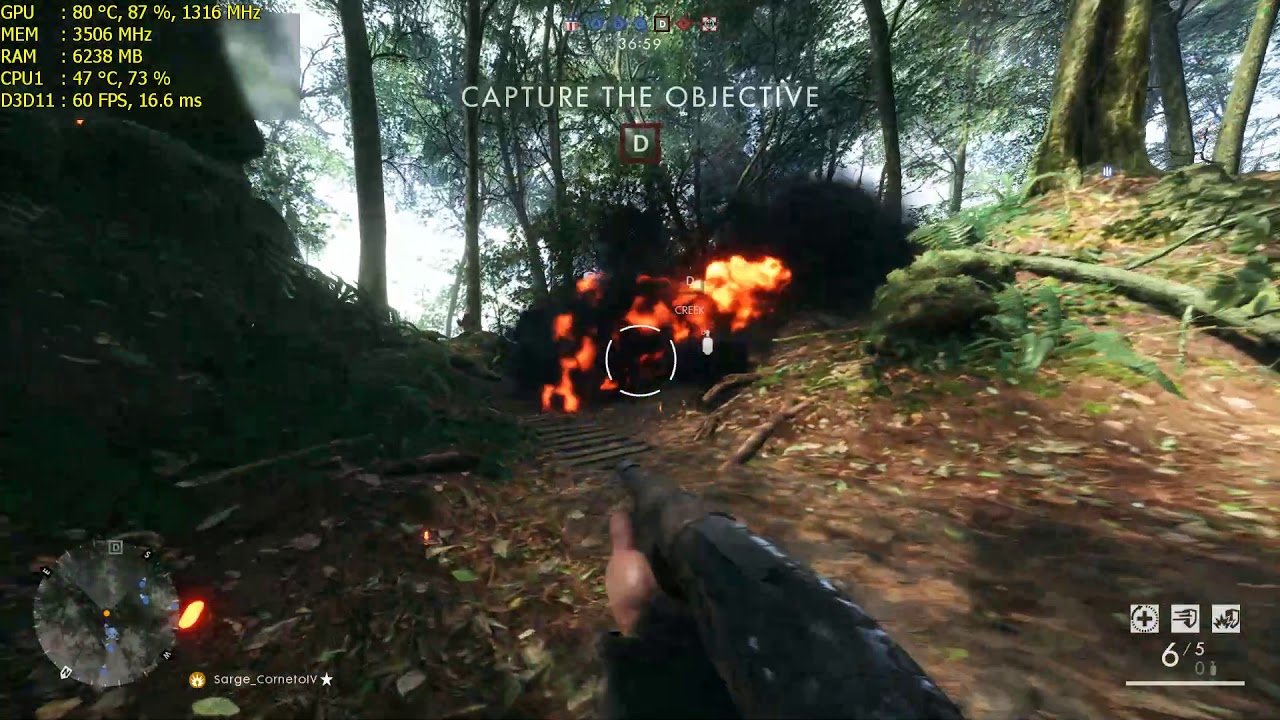
My specs -
GPU: GeForce GTX 960
CPU: AMD FX™-6300 Six-Core Processor
Memory: 8 GB RAM (7.97 GB RAM usable)
Current resolution: 1920 x 1080, 60Hz
Operating system: Microsoft Windows 10 Pro
Ok, i mention this many times, there is some nasty bug that pegs your cpu to 100%, literally 100% all cores, i had that problem and only solution is changing server or restarting completly origin and PC,i looked in task manager when that happened and its only bf1 that was consuming 100%..on one server i had literally below 60,40 and 50 all the time no matter the settings,changed server and everything was back to normal 70 fps min,with cpu usage between 70 and 90% in worse situation,on mixed ultra high settings with post process on medium off course..
I dont know is it due to windows or server issues,or maybe even origin, if dice would be kind to look at that would be great,there is many people with this problem not realizing its not their problem,trying to fix the things on their end and making things worse..the best solution for now is to find server and if everything works fine make that server favorite and see how long it goes well..
I m glad its working well for you now, but trust me that thing,bug is random,its just the matter of time when it appears again..
Are you on Creator’s Update? If you are, then there’s the main culprit.
My specs are not oudated. If they were i coulsn’t even run the game. Read the whole thing dammit… i said the game worked with 60 fps before august. I reinstalled my windows and put an older version, dunno if i have the creator one
go to nvidia control panel, set max prerender frames to 1, cpu load goes down.
Can’t believe this is still going over a year after the games release! This game is very CPU heavy and it doesn’t seem to like just 4 cores without loading them to 100%
u
close a programs running in the background,minimize origin especialy
-Do you use an ssd or hdd?
what build of windows 10 or you using, the later builds are buggie 1607 is good)
type at in search(next to the windows flag icon on the left) winver and hit enter
-this game likes 16gb
8gb gives me fps drops and the game also uses more memory,when you install more system memory to the system
I have a pretty old hdd. Only bf is 100% utilization and my winver is 1511
Game is made for 8 core cpu aka 8 hardware threads(console cpu), a 4 core cpu only has 4 hardware threads and has to run much faster to handle code for 8 hardware threads.
PC is not the leading platform anymore so we get stuck with a console port, pc servers run on a similar system as on console, i3d and amazon are also known as providers for game servers on console.
Casual game play, no depth, aim assist for controller users on pc, its like they are keeping the code similar so they dont have to make patches for different systems.
still there is no other game,that stresses hardware this much as bf1,
But an SSD will definitly help for smoothness of gameplay and also the whole system will have an snappier response.
Loading maps,will be much faster too
since the november update im getting huge fps drops what can i do???
Ya I
N
Noticed to since the new update fps droped a bit on the Russian map with the church when im.inside with like 50 people with i get drops to the sub 105 fps being th3 worst and normal I’m 140+ before used to be around 115 120.
This is on the rig in my sig.
Also to playing operations on the Russian maps I get drops down to the 110s gpu ussage drops to wich means it’s cpu related.
7700k 5 ghz with 3600 mhz ram dropinf to 100 fps some times lol .
I watched alot of 8700k videos and that cpu is 6 core 12 thread and same spots with same 1080ti card gets like 40 or more fps in same spots. This game loves cpu cores any 6 core + is where u want to be the 7700k even at 5 ghz can’t hold 120 fps on some maps in 1080p ultra it gets drops.
All the destruction and phys x of stuff blowing up puts strain on the cpu and a 6 + cpu realy shines In this game.
I have a 8700k on the way thought the 7700k @ 5 ghz would last but apparently not for 144hz with out drops in this game lol.
I know some 5820k 6 core users that said this game almost mazes there cores out
And 8700k user reports up to 70% max
agreed, 6 core (12 thread) is needed not to bottleneck the system at all, sad but true.
My 5820K at 4.2ghz sees 85% usage in some very rare instances.
Nope, this game is impossibe… I replaced the thermal paste because that one was dried and nothing. I tried everything but bf is the only thing taht reaches 100% utilization. I also set the prerendered frames and none. I think i’ll unistall this stupid game once and for all. I am happy i played this game just fine for 2 months