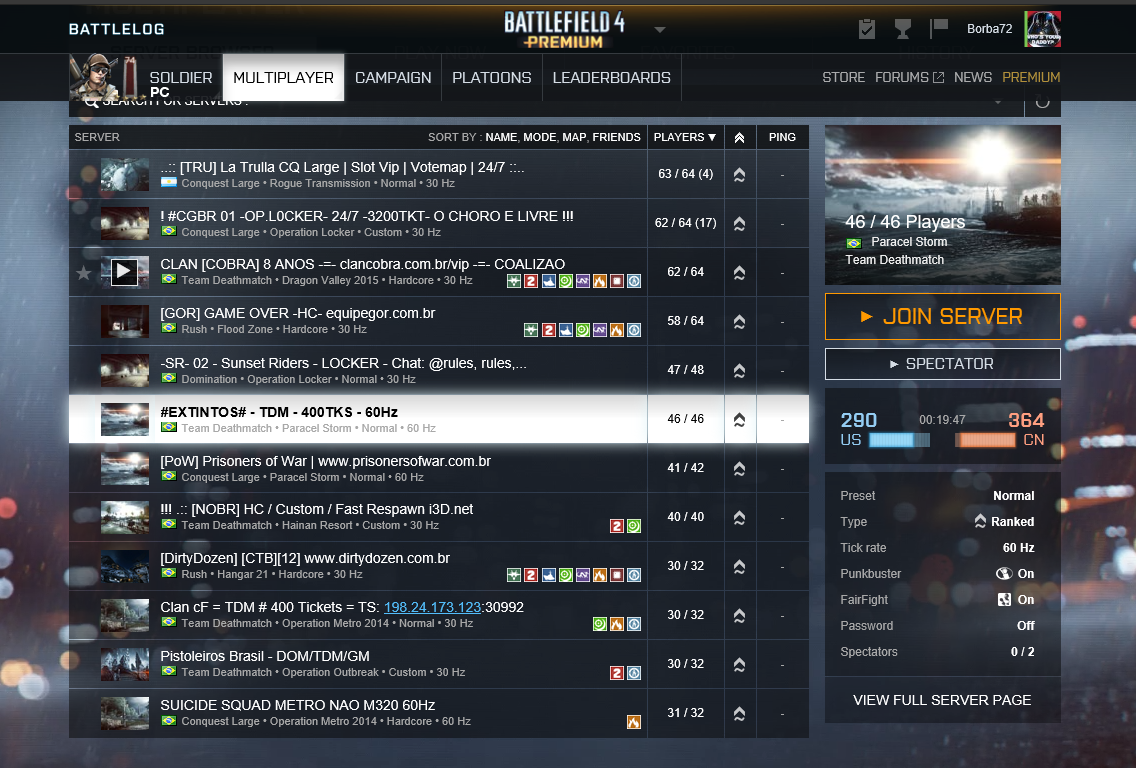
I’m on Windows 10, and using Edge as browser. The pings are not displaying. Is there a way to fix this?
Apparently nothing seems to help. I’ve already changed browsers, created rules on the firewall, and nothing.
SOLVED
Having the same issue. I have tried Chrome, Firefox and IE on 64 bit Windows 10. In the past when no ping displayed it was because a new web plugin needed to be installed. I do not have any prompt to install a web plugin now, unless the prompt for it has changed and I have not seen it.
EDIT: Figured it out by reading another forum post. The problem was with the Origin Beta client. I had enabled the Origin beta within the Origin client. I unchecked the Origin Beta in the Origin, restarted Origin and also restarted my browser. Pings show up now.
As far as I know the plugin is not needed anymore. I don’t know what to do, this is pretty annoying.
I’ve got Beta too, but unchecking the beta option doesn’t revert Origin to previous versions..
It’s showing like this:
SOLVED!
I uninstalled Origin beta, reverted to previous version, and now it Works.
who i know about version origin ?
same problem here, no pings show up, but i DON’T have the beta option checked. … so how do i get the pings back?