DX 12 causes a lot of stuttering on my system. Turning future frame rendering on or off doesn’t fix the low fps. Switching to dx11 solves the issue and gives me 15 more fps in the same spot and very less stutters. DX 12 should be fixed so I can atleats try out RTX features.
Yep dxr can do that sadly. And dlss just makes the game so ugly. With it on i get like 100~ fps without it goes down to 70-80. Not worth it as i have a 144hz monitor and i need the fps above 100+.
Works fine with 1809 at dx12.
Unfortunately the inputlag is noticable in close combat so I prefer dx11 with somewhat lower fps. Maybe you meant something else?
not necessarily, if you have a powerful card, the game will need to keep up with the data you are pushing from the video card, so its best to match a cpu that can handle the data that you gpu is pushing ( even at ulltra settings, your gpu will render as much as it can, the more it is capable of rendering, the more cpu is needed to keep latency low from the gpus’ memory.)
EDIT: you are right about DX 12 as the foundation is DX 11, but besides a second freeze or 2 in the beginning of the game, it runs very good on my machine
My 2600k did pretty good with gtx1080, my 9900k is overkill and requires a faster GPU.
This is ofcourse at 1440p, where the GPU is more taxed.
You need the clockspeed though from CPU.
My 2600k at default had some big fps drops, overclocked to 4,5Ghz was stable and saw few drops, which are minor in comparison.
I can imagine the same goes for later gen cpus.
Anyway, a gtx1070 would be better paired with that 2600k, yet the gtx1080 still did better on my system. I see some people with a 2080ti and an old Intel CPU, they do fine, plus when they upgrade that CPU, they already have a powerful GPU.
So ofcourse a balanced system is crucial, but that isn’t just CPU+GPU. It’s everything combined plus stable overclocks at minimum extra heat.
Therefore I suggest to people to get the fastest component they can afford, because eventually they upgrade the next part.
It has to be sensible though. No sense in overpaying for 2 fps extra.
I just noticed there’s 5 separate system requirements for BFV. Including a new system requirement for competitive play.
RECOMMENDED PC SYSTEM REQUIREMENTS FOR DXR
OS: 64-bit Windows 10 October 2018 Update (1809)
Processor (AMD): AMD Ryzen 7 2700
Processor (Intel): Intel Core i7 8700
Memory: 16GB RAM
Graphics card (NVIDIA): NVIDIA GeForce® RTX 2080
DirectX: DirectX Raytracing Compatible video card
Online Connection Requirements: 512 KBPS or faster Internet connection
Available Disk Space: 50GB
RECOMMENDED COMPETITIVE SYSTEM REQUIREMENTS
OS: 64-bit Windows 10 or later
Processor (AMD): AMD Ryzen 7 2700 or equivalent
Processor (Intel): Intel Core i7 8700 or equivalent
Memory: 16GB RAM
Graphics card (NVIDIA): NVIDIA GeForce® RTX 2070
Online Connection Requirements: 512 KBPS or faster Internet connection
Available Disk Space: 50GB
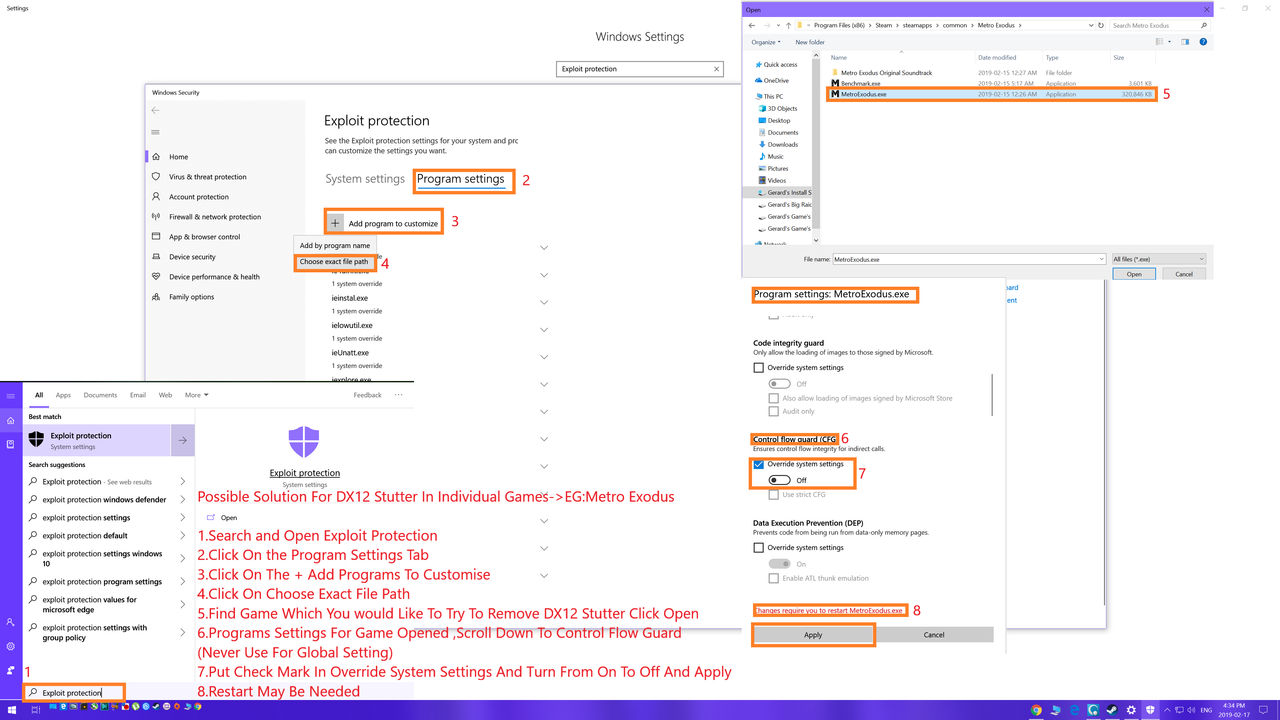
Possible Solution For DX12 Stutter In Individual Games->EG:Metro Exodus/BF5
**1.Search and Open Exploit Protection
2.Click On the Program Settings Tab
3.Click On The + Add Programs To Customise
4.Click On Choose Exact File Path
5.Find Game Which You would Like To Try To Remove DX12 Stutter Click Open
6.Programs Settings For Game Opened ,Scroll Down To Control Flow Guard(Never Use For Global Setting)
7.Put Check Mark In Override System Settings And Turn From On To Off And Apply
8.Restart May Be Needed