I’m having these icons pop up on the right side of my screen. Sooooo annoying. I’m running a,
I7 3770K stock
16gb ddr3 1333
GTX 970
500gb SSD (game is installed on)
Game usually hovers at 25 ping
I run the game on ultra and get over 60 fps at all times and yet the fps icon pops up in yellow warning me of low framerate. Is there a way to disable this, “feature”?
You can turn them off in the settings.
Thx for responding. I looked and didn’t see it under gameplay or video settings. Maybe I’m just stupid and don’t see it. Do you remember what it was called?
I found it. Under gameplay, advanced, network performance indicators. I just spent 40 min on the phone with battlefield 1’s technical support team and they didn’t know what these icons were. I had to send them to a webpage to learn all about it. Eventually they couldn’t help me and sent me on my way. The forums here seem to have a higher IQ. Thx BiggyD1313 for the reply. Now I can enjoy the game without those annoying icons popping up.
Haha even their support didnt know what they were? A little worrying…
Is it the small video/film icon that appears from time to time in the game? I would like to know how to get rid of them as well.
What do they mean?
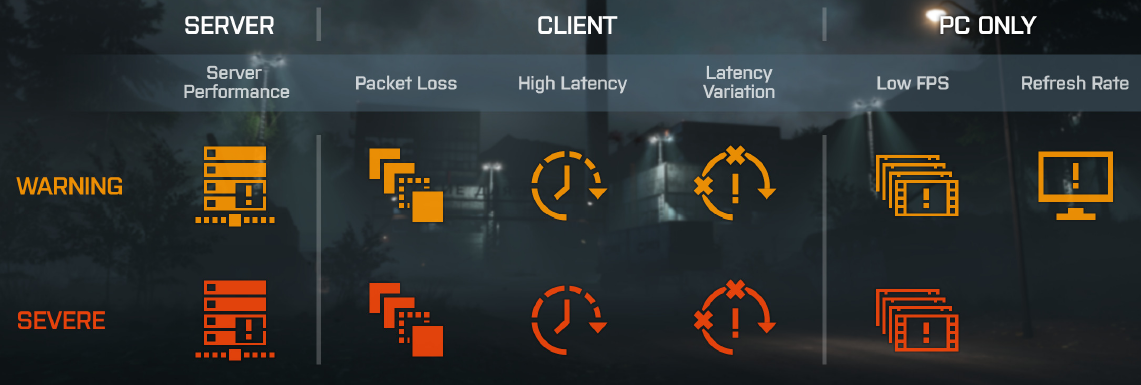
They are useful… you probably don’t want to get rid of them. You might want to investigate why they’re happening.
yeah been seeing the server icon many times lately
thats weird i have a ryzen 7 and a gtx 1080 and im getting the low fps symbol, yes im running on ultra settings but still…
I think it’s a bug that causes it to still pop up. Even when you are getting above 60 frames per second. Even if I am averaging 70 FPS, I will also get the low FPS warning as well.
Which is quite strange in and of itself, It’s something I’ve noticed since the Fall patch of last year.
This is the reason I got rid of them. They obviously don’t indicate problems as they should
Im on PS4PRO and today my ping has been around 140, it was really bad. The yellow icon under the client picture above was showing all the time.. Normally i have 60. Tried restart router, disconnect phones etc from the network, but no luck. I did some test of the speed on my internet and it was 50mbit like it should be. Ant ideas? Is it Dice or me?
Just two words: Spring DOWNgrade
Isn’t your router or network. Is the patch applied from DICE to the game, many people complaining about the high ping and hit detection issues… the DICE guys feel nostalgic and return to the problems of BF4 the launch day.
/Necro