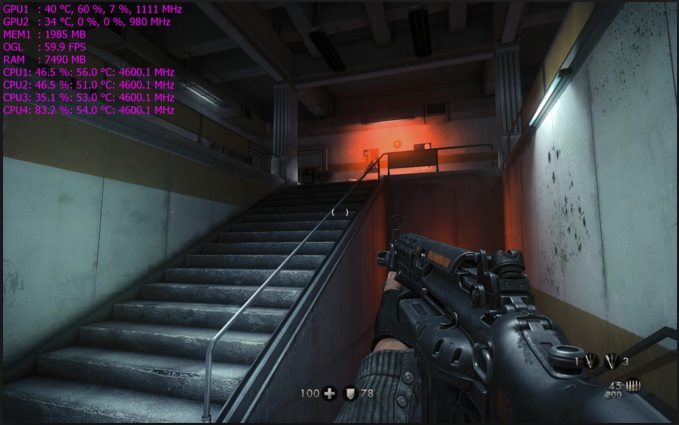
Ive tried all kinds of graphics options
Ive tried sveral other options on pc
Gpu drivers up to date
I didnt oc the cpu - dont have additional cooling
Ive tried the oc genie feature,but come up with unstable slow system…
I dont understand why i have such an awful framerate. I saw videos on yt with same specs running game on 60 fps, there is just no way to get this game running…
Are my specs just way too old or what ? I dobt think so…
Is the ram in dual channel mode? Even if it is you’ll still get framerate drops below 60fps with a 4core/4thread cpu. A 4core/8thread i7 will handle this game much better.
The official minimum CPU requirement is listed as an i5-6600K although it is likely a bit higher than that since BF1 also listed that as the min spec CPU (things have changed since).
BFV is a pretty CPU intensive game so you’ll either have to OC your current one for a few extra frames or get a new CPU, preferably an i7 with at least 4 cores and twice as many threads.
The jump from i5 to i7 is huge. We’re talking a 15-30 fps gain, at least for me and this was for BF1. If anything, BFV will likely prove to be even more demanding on the CPU.
This game runs like crap on most 4 core system’s, only thing i can recommend is overclock the snot out of the cpu, and try raising the resolution scale to smooth out the fps.
Well ive tried some overclocking but my pc got slowed down, long windows startup and took ages to run the game. I get even worse fps (8?) On oc to 4.2 …
Yes i know, i should buy some better cooling for cpu,but anyways,i thought id get better performance just for a while…
Yes ive noticed biggest fps drops on snow maps (the one with the big church and in the mountains).
When round starts, its all fine - 40 fps… as soon as two teams meet and shoot, fps drops to 15-25 with stuttering
When i lie dead the framerate stays low
When i look up in the sky i got 50 fps
Biggest drops are in face to face fights
Well i might consider buying some good cooling for my cpu… or just screw the whole game and live my life in the real world
Ive used the msi afterburner app. without any knowledge of what im doing ive raised the performance of cpu a little bit somehow and the result is better. Not perfect, just a bit better
Here’s a thread that explains how to get the on-screen display working in MSI Afterburner. I don’t use it to overclock anything. I just use it to see CPU usage and temperatures while playing games.
BF1 had the same problem with 4-core CPUs, there was never a patch that fixed it, instead CPU-usage went up during BF1’s lifetime.
Probably the same will happen in BFV.
The only hope is that they utilize DX12 better, it can lower cpu-overhead. But probably not enough for 4-cores and older Nvidia-cards have mixed results with DX12.
The USB drive doesn’t need to be bootable, it does need to be formatted in FAT16 or FAT32 though. There should be an M-Flash update option in the bios menus.