Only works on 1440p or higher. But you’re not missing out. A hyped feature but makes the game look ugly and blurry.
I have 1440p
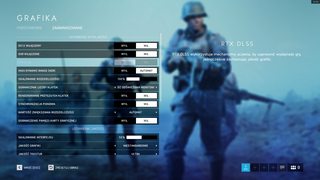
Cant use DLSS… buggy game?
Guys, stop freakin out. It will just make your game more blurry.
Many people can make it run in 1080p, it was also said that it was available in all resolutions
i think is buggy… it was said that it was available in all resolutions…
so I just played around a bit and got it to scale with SLI like it used to.. use the same howtos as before, but before loading the game, go to “/ProgramData>NVIDIA Corporation>Drs/” and set both nvdrsdb0.bin and nvdrsdb1.bin to read-only..
so far it worked but I don’t think this is the full answer, since you then can’t change any setting for other games without first removing the read-only attributes from those files first… maybe you could create a script that’d set it read-only before launching the game…
Also don’t know if this will get anyone in trouble, since they’re clearly trying to hinder the use of profileinspector .. might be good idea to record gameplay if you’re using this, to prove that you aren’t using it for cheating.
looked great no blurr to me but the crashes are an problem i hope the will fix it soon
Legend
textures seemed a ton sharper to me but refresh rate felt off but it could be because my fps was randomly dropping drastically maybe screwing with gsync and vsync i no idea but it wasn’t working properly. back to dx11
OK ..
why ? because : 
Do you need the latest Nvidia patch as well to be able to enable it?
Is it joke? :#
Can u use the old driver do it work then.or is it dice patch for the game.
I made a list for you guys and girls to follow in order to make Sli work again.
-
First go make sure “C:\ProgramData\NVIDIA Corporation\Drs” Right click → Properties and unselect read-only on both files nvdrsdb0.bin and nvdrsdb1.bin
-
Now run nvidiaProfileInspector.exe and select Profile: Battlefield V
-
Set “SLI compatibility bits dx10 + dx11” to : 0x080116F5
-
Set “Nvidia predefined number of GPUs to use on SLI rendering mode DX10” to : 0x00000004
-
Set “Nvidia predefined SLI mode on DirectX 10” to : 0x00000002
-
Click Apply Changes and close nvidiaProfileInspector
-
Go back to “C:\ProgramData\NVIDIA Corporation\Drs” Right click → Properties and select read-only set both files nvdrsdb0.bin and nvdrsdb1.bin to read-only
Sli should again work with dx11.
But you need to make sure and unselect the read-only everytime you want to make a change to settings in the future.
But you need to make sure and unselect the read-only everytime you want to make a change to settings in the future.
Is this only for bf5 settings or all games
Same, crashes since RTX and DLSS update. Hoping for a quick fix.
all games. but to specify, it’s anytime you want to make changes in nvcp or profile inspector I believe.
Did they disable because of Nvidia Profile Inspector glitch?
that’s my guess.