It’s nothing new that new Nvidia technologies are buggy and lack support, especially in the beginning, to a point where it doesn’t make sense to enable. Stability and adaptation would probably have been bigger if it wasn’t a proprietary technology and they had made it an open standard partnering with Sony, Microsoft, AMD and Intel.
Nvidia SLI is a proprietary technology handled by Nvidia. So, if that’s your question it’s probably better asked over at: https://forums.geforce.com/ as they have the developers you are talking about.
The developers at NVidia have publicly stated that this is Dice’s doing. They (NVidia) had SLI working for BFV before the game launched, and then when it did launch Dice undid something, breaking SLI. So, the OP’s question is properly posted here vs the GeForce forums. No one at NVidia can help us with this. It’s on Dice’s shoulders.
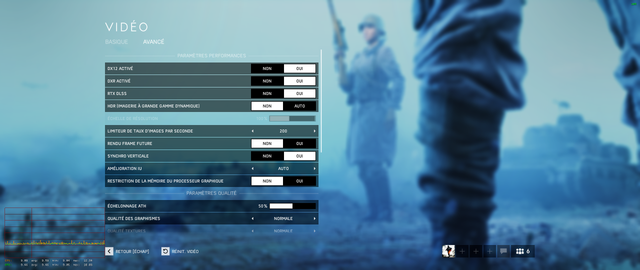
Just updated the game, installed new drivers before running game. Restarted computer. Game runs fine, DLSS automatically turned on. RTX automatically turned on. Game runs fine so far.
Check you cpu usage and temps. I think the patch has broken the game with RT and dlss on at least. i’m getting bsod nd usage of 100% with temps in the 90’s which then crashes my pc. This on an 8700k
^^^ This. According to the link at the other thread this is possibly just some ham fisted way to “fix” the LOD exploit. The problem as one poster noted is they are playing in areas outside their game install.. which IMHO is a no-no. And I quote:
Apparently the “fix” is to make a few files read only so the game cannot change them. Wonder what other files on my PC DICE thinks they have the right to play with?
I’m on 2080TI newest nvidia drivers 418.91. With DX12/RTX/DLSS enabled.
Did not have any issues prior to patch/driver updates.
System:
i7 8086k/32gb @ 3600/z370 asus formula/2080TI
Initially game will load into server, but it takes only seconds after for it to crash to desktop once in game. Reloading the game simply causes it to crash, have to run repair through origin or restart pc.
 put this in your console render.useresolutionscalefromNGX false