Getting the same crashes. Once it crashes the game will not load past the splash screen, just crashes back to the desktop and of course no error message. I have to quit trying for 5-10 minutes to even get past the splash screen, but it eventually crashes again. i7 4790K OC’d to 4.5 GHz, 32 GB ram OC’d to 2400 MHz, and RTX 2080. Never had a problem until last update. Hopefully can try DX11 after work today…
Fixed title.
Did they kill sli to force us to try dlss?
I want my sli back for my 2x2080ti.
Yesterday!
It is still there, yes they did alter some things to make this more difficult to work. We can get your SLI back and running. I am not happy EA changed properties of files without my permission. WE HAVE TO RIGHT TO KNOW WHAT EXACTLY THEY DID. I have a work around for U
Same here. Crashing sometimes after playing a 20min, sometimes after a few minutes, sometimes even in the menu. Did not play once without crash.
i7 8700k, 32gb, gtx 2080
I’m getting crashes too. 4790k, 16gb 2133 ram, 2070. DLSS looks like blurry garbage, so I’m just going to stick to RTX off for now. It looks good, but I barely notice it when I’m actually playing anyways.
LOD bias can still just as easily be adjusted to PotatoField mode. EA couldn’t code their way out of a wet paper bag.
What’s with the EA hate?
I mean, EA are the publisher, So you’re kinda right, EA don’t really code anything when it comes to videogames… They just fund the development and do the PR and advertising.
That’s what developer studios are for ( DICE / Respawn etc )
But you knew that, Right?
Can you post it one more time?
Is it the “read only” on 2 nvidia files  ?
yes it is
Still no official fix? WTF?
Same here.
With the latest game patch, I was able to login to the game and play. I updated my settings to DXR enabled and DLSS enabled.
Everything was fine.
Then, I updated to the latest Nvidia drivers that were released yesterday.
Now, I cannot launch the game. It will get to the splash screen, then CTD.
Found this in Event Viewer:
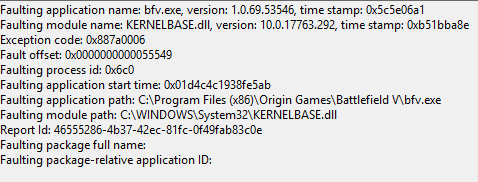
Good news. I found a workaround that works for me.
The problem appears to be with DLSS.
You can manually disable it by doing the following:
- Exit BFV
- Open Windows Explorer.
- Navigate to C:\Users<username>\Documents\Battlefield V\settings
- Edit the file PROFSAVE_profile
- Find the line that looks like this: GstRender.DLSSEnabled 1
- Changed that line to look like this: GstRender.DLSSEnabled 0
- Launch BFV.
Same here. I got my 2080Ti just a few days ago, so i dont know if its the patch. However the game always crashes to desktop after 15-30 minutes. I think it is DX12 or DXR, dont get crashes with DX11 and i dont have DLSS (2080ti, 1440p monitor, no dlss support)
I’m pushing 3x32" monitors in surround 7680x1440 (60hz) and need both 1080ti’s OC’d to keep decent 60fps with decent IQ settings. If a single 2080ti could manage that I’d have jumped on one already. As it stands my OC’d 1080ti’s still spank a single 2080ti.. when they are allowed to work that is.
Fer chrest sakes DICE.. pull yer collective heads out. At a minimum stop breaking what stuff or get SLI working on your own.
Just installed BFV update today Feb 14th, 2019. Also the latest Nvidia driver 418.91. Now my SLI is not working anymore. I’ve reinstalled Nvidia driver 417.71 that did work and for some reason now, once I start BFV game the setting/profile goes back to original settings. No SLI only single GPU. I’ve tried several time and it always seems to go back to non-SLI and only single GPU. You cheaters caused all of this crap and always a few idiots thinking that cheating is fun to get higher scores etc. You should absolutely be banned forever. Now thousands of us that spent hard earned money on nice PC’s hardware and graphics cards can’t SLI our GPU’s anymore. Thanks you dam cheaters for this crap. Please get out of the PC gaming and don’t come back.
If anyone comes across how to get my two 1080ti to SLI again on BFV, please share your settings because it looks like it will always put your setting back to original once the game starts.
Same here, Asus ROC RTX 2080, i7 4770k, 16G Ram, temps in the 50s. Exception Code says 0x887a0006. https://docs.microsoft.com/en-us/windows/desktop/direct3ddxgi/dxgi-error says: “The application’s device failed due to badly formed commands sent by the application. This is an design-time issue that should be investigated and fixed.”
Not sure whether turning off DLSS fixes it, but it reduces the frequency at least. Might want to try setting GPU restriction to ON, but as it says “failed due to badly formed commands sent by the application”, I don’t think it’s going to make a difference.
Go back a page and you will find your answer
Same issue here. Once I enable these the game freezes. Tried the whole DDU, reinstall new drivers no change. Gigabyte 2070 windforce.
Check your event viewer “system”
I see this when it crashes:
The description for Event ID 13 from source nvlddmkm cannot be found. Either the component that raises this event is not installed on your local computer or the installation is corrupted. You can install or repair the component on the local computer.
If the event originated on another computer, the display information had to be saved with the event.
The following information was included with the event:
\Device\UVMLiteProcess1
Graphics SM Warp Exception on (GPC 0, TPC 4, SM 0): TEX FORMAT Errors
The message resource is present but the message was not found in the message table
I played for 2 hours last night in DX11, not a single problem the entire time.